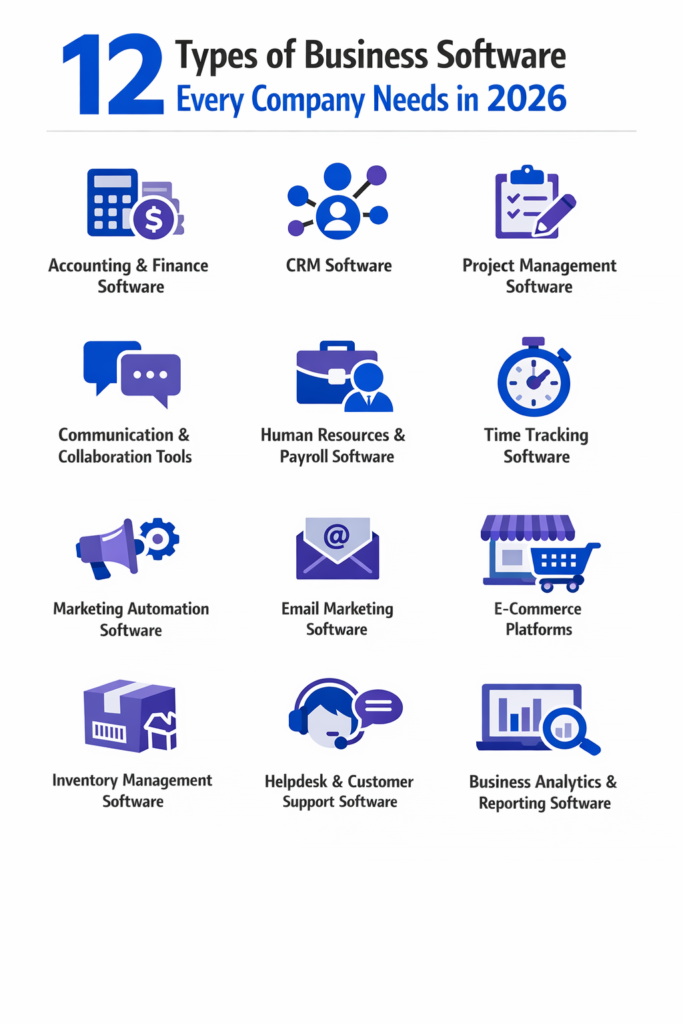
Running a business without the right software, or without clarity on what software it actually needs, creates structural damage that compounds over time, slowing productivity, degrading decision-making, and driving up labor costs.
The business software market hit $666 billion this year and is racing toward $1.523 trillion by 2034—not because software is trendy, but because it’s become the operating system for companies that survive and scale.
The question isn’t about having fancy tools, but whether your business can compete when customers expect instant responses, when mistakes cost you a reputation you can’t recover, and when manual processes drain resources you don’t have to spare.
This guide breaks down the 12 types of business software that separate businesses stuck in survival mode from those building systems that scale.
Key Takeaways:
- Software infrastructure determines your ability to scale, not just operate efficiently
- The 12 essential categories cover operations, customer relationships, and strategic decision-making
- Integration between software types matters more than individual tool features
- Stage-based adoption prevents overspending while ensuring you don’t miss critical gaps
How We Identified the 12 Essential Types of Business Software
Most articles on business software list popular tools without explaining the operational gaps they fill. Others present every category as equally urgent, leaving you paralyzed by choice.
This guide takes a different approach: it explains what each software type manages, why it’s critical in 2026’s competitive environment, and how different categories work together to create a cohesive operational system.
The categories here come from analyzing what top-performing businesses actually use, not what vendors push.
We looked at operational patterns across small to enterprise companies, identified where manual processes create bottlenecks, and focused on categories that deliver measurable returns rather than impressive feature lists.
Accounting and Finance Software
Financial Chaos Starts Small, Then Compounds
Consider how this pattern typically unfolds: you miss tracking a few expenses, then tax season arrives, and you’re reconstructing transactions from memory and bank statements.
A loan application requires financial statements you can’t produce. What started as “we’ll organize this later” becomes a crisis that costs you opportunities and money.
Accounting software manages your financial operations: bookkeeping, expense tracking, financial reporting, and tax compliance.
It records every transaction, categorizes expenses, generates profit and loss statements, and maintains the audit trail that regulators and investors expect.
Why Is Accounting Software Critical in 2026?
Financial visibility isn’t optional anymore because you need real-time insights into cash flow, not month-end reports that tell you what happened when it’s too late to adjust.
Regulatory requirements continue to increase in complexity—especially for businesses operating across state lines or internationally.
Integrated financial systems ensure compliance while reducing manual processing errors.
Core Features to Look For
- Automated reconciliation eliminates the hours you’d spend matching transactions to bank statements
- Invoicing and payment processing should connect directly to your accounts, updating financial records without manual entry
- Profit and loss statements you can generate on demand, not systems that require an accountant to interpret basic financial health
- Integration with banks and payroll systems ensures data flows between systems without creating disconnected records that force you to reconcile manually
What Are Common Mistakes to Avoid?
- Using spreadsheets works until it doesn’t—usually right when you need clean financial records for a loan application, tax filing, or investor review.
When that breaking point arrives, the transition costs more because you’re migrating years of disorganized data instead of starting clean.
- Mixing personal and business finances creates tax nightmares and makes it nearly impossible to track actual business performance.
Customer Relationship Management (CRM) Software
Customer Retention Costs Less Than Acquisition, But You Can’t Retain Customers You Don’t Understand
These scenarios reveal the problem: your best salesperson leaves and takes six months of relationship context with them.
A customer references a conversation from three months ago that no one on your team remembers.
You’re pursuing lukewarm leads while hot prospects go cold because follow-up fell through the cracks.
Customer relationship management software centralizes everything about your customers and prospects: contact information, communication history, sales pipeline status, and purchase patterns.
It tracks which leads are ready to buy, which need more nurturing, and which deals are stalling.
Why Does CRM Matter for Business Growth?
CRM systems make customer data actionable rather than scattered across email inboxes, spreadsheets, and individual team members’ memories.
The CRM market reached $73.40 billion in 2024 and is expected to hit $163.16 billion by 2030, growing at 14.6% annually as businesses realize that centralized customer data directly impacts revenue predictability and competitive advantage.
Key CRM Capabilities
- Deal stages show you exactly where each opportunity sits in your sales process and what action moves it forward
- Follow-up automation ensures no prospect falls through the cracks because someone forgot to send an email
- Email and call logging create a complete communication history—essential when team members change, or customers reference conversations from months ago
- Reporting dashboards show which marketing sources generate the best leads and which sales activities actually close deals
CRM for Small vs Scaling Businesses
| Small Businesses | Scaling Businesses |
| Lightweight CRMs work when managing dozens of relationships and simple sales cycles | Need systems that handle complex sales processes, multiple team members working the same accounts, and integration with marketing automation and customer support |
| Focus on basic contact management and pipeline visibility | Require advanced automation, detailed analytics, and cross-functional data sharing |
Choose based on where you’ll be in 18 months, not where you are today.
Project Management Software
When Teams Don’t Share Physical Space, Informal Coordination Dies
This breakdown manifests in familiar questions: Who’s responsible for this? When is it due? What’s blocking progress? What dependencies exist between tasks?
These questions derail projects when answers live in someone’s head or are buried in email threads that half the team never saw.
Project management systems handle task assignment, deadline tracking, milestone management, and cross-team coordination.
They replace the informal coordination that happens naturally in offices with structured systems that work across time zones and work schedules.
Why Do Remote Teams Need Project Management Software?
Visibility becomes critical when teams don’t share physical space, creating accountability by making commitments and progress visible to everyone who needs to know.
This transformation replaces operational chaos—the kind that burns resources on miscommunication and duplicated effort—with clarity about priorities, ownership, and status.
Essential Features
- Task boards provide visual workflow management that’s easier to scan than lists or spreadsheets
- Gantt charts show dependencies and help you spot scheduling conflicts before they cause delays
- File sharing keeps project documents centralized rather than scattered across email attachments and personal folders
- Role-based access ensures team members see what’s relevant to their work without information overload
Communication and Collaboration Tools
Coordination Infrastructure Determines Whether Distributed Teams Function or Fracture
Team messaging creates organized conversations around topics, projects, or teams—replacing the chaos of email threads that lose context and bury important information. Video conferencing enables face-to-face communication for distributed teams.
Shared workspaces bring documents, conversations, and project updates into one place where context doesn’t get lost between tools.
What Are the Benefits of Communication Tools?
- Faster decision-making happens when you can get quick answers instead of waiting for email responses
- Reduced email dependency improves focus—email demands immediate attention even for non-urgent topics, while team messaging creates channels you check when it makes sense
- Knowledge retention improves when conversations happen in searchable channels rather than individual inboxes that create information silos
What to Standardize Across Teams
The most critical standardization decision involves picking one primary communication hub and enforcing its use.
Multiple messaging platforms fragment conversations and force people to check multiple places for updates.
Documentation practices matter more than the specific tool—establish where decisions get recorded, how project updates get shared, and what information needs to be accessible to people who weren’t in the original conversation.
Human Resources and Payroll Software
Manual HR at Five Employees Feels Manageable. At Fifty, It’s a Compliance Disaster Waiting to Happen
The consequences of manual HR systems compound as you grow. Payroll errors damage trust and create financial liability.
Poor employee experience—long waits for basic requests, confusion about benefits, difficulty accessing information—increases turnover in tight labor markets.
Compliance risk multiplies as you add employees and operate in multiple jurisdictions.
HR software manages employee records, payroll processing, benefits administration, and compliance requirements.
It handles onboarding paperwork, tracks time off, processes payroll taxes, and generates reports that regulators require.
Modern systems include employee self-service portals where staff can update personal information, view pay stubs, and request time off without creating administrative overhead.
Must-Have Features
- Automated payroll calculates wages, deductions, and taxes without manual spreadsheet work that’s prone to errors
- Tax filings happen automatically based on current regulations rather than requiring you to track changing requirements across jurisdictions
- Time-off management gives employees visibility into balances and approval status while giving managers oversight without constant email exchanges
- Employee self-service portals reduce HR workload by letting staff handle routine tasks independently
Time Tracking Software
Invisible Time Equals Invisible Profit
This principle plays out across several business contexts. Service businesses that bill by the hour need accurate time logs to ensure profitability.
Agencies managing multiple client projects simultaneously must track where team members spend time to understand project profitability and resource allocation.
Remote teams benefit from time tracking that creates accountability without micromanagement.
How Does Time Tracking Impact Business Profitability?
- Accurate billing ensures you capture all billable hours—the difference between profitable projects and money left on the table
- Productivity insights reveal which tasks consume more time than expected and where process improvements deliver the biggest returns
- Cost control comes from understanding actual labor costs on projects rather than relying on estimates that miss the hidden time drains
Core Capabilities
- Time logs should be easy to create and categorize—friction in time entry means people skip it or batch entries days later, when accuracy suffers
- Project-based tracking shows you exactly what each project actually costs in labor
- Reporting needs to show patterns: which project types run over budget, which team members need support, and where scope creep consistently undermines profitability
Marketing Automation Software
Personalized Marketing at Scale Used to Require Massive Teams. Now It Requires the Right Software
Marketing automation manages email campaigns, lead nurturing sequences, and customer segmentation at scale.
It sends the right message to the right person based on their behavior, stage in the buyer journey, and demographic characteristics—without requiring someone to manually decide who gets what message.
Why Is Marketing Automation Essential in 2026?
Marketing automation has evolved from basic email scheduling to sophisticated systems that adjust messaging based on engagement patterns.
Reduced manual marketing work frees your team to focus on strategy and content creation rather than repetitive campaign execution.
Key Features
- Workflow automation creates sequences that respond to customer actions—someone downloads a guide, and they enter a nurturing sequence. Someone visits pricing pages three times, and they trigger a sales notification
- Analytics and attribution show which marketing activities actually drive revenue rather than just generating activity metrics
- CRM integration ensures marketing and sales work from the same customer data instead of maintaining separate, conflicting records
Email Marketing Software
Email Remains the Highest-ROI Marketing Channel for Most Businesses
Email marketing software manages newsletters, promotional campaigns, and product updates—the regular touchpoints that keep your business visible to customers and prospects without requiring you to manually send individual messages.
Non-Negotiable Features
- Deliverability controls ensure your emails reach inboxes instead of spam folders—reputation management features that prevent your domain from getting blacklisted
- List segmentation lets you send relevant messages to specific groups rather than blasting everyone with everything
- Analytics show open rates, click rates, and conversions so you can identify what resonates and what gets ignored
E-commerce Platforms
Customers Now Research, Compare, and Purchase Online Even from Businesses That Once Relied Entirely on In-Person Sales
This shift toward digital transactions reflects broader behavioral changes. Direct-to-consumer shifts and online-first buying behavior mean customers expect to find you online. B2B buyers increasingly prefer self-service purchasing over traditional sales processes.
Having e-commerce capability isn’t about abandoning other channels—it’s about meeting customers where their buying behavior has moved.
E-commerce platforms handle product listings, payment processing, order management, and fulfillment coordination.
They provide the technical infrastructure for selling online, including shopping cart functionality, secure checkout, and inventory synchronization.
Platform Capabilities
- Payment gateways need to support multiple payment methods while handling security and compliance requirements, you can’t manage yourself
- Inventory synchronization prevents overselling by updating stock levels in real-time across sales channels
- Tax handling becomes complex quickly as you sell across state lines or internationally—good platforms calculate and collect appropriate taxes automatically
Inventory Management Software
Stockouts Cost You Sales. Overordering Ties Up Cash in Inventory That Sits Unsold
Different business models face this challenge in specific ways. Retail businesses tracking physical products need inventory systems to prevent both scenarios.
Manufacturing operations managing raw materials and finished goods require visibility into what’s available and what needs ordering.
Wholesale distributors coordinating between suppliers and customers need accurate inventory data to fulfill orders and manage cash flow.
Risks of Manual Inventory
Disconnected inventory data across sales channels creates the worst scenario: telling customers you have stock you don’t actually have available.
This damages customer relationships when you can’t fulfill orders and creates cash flow problems that prevent you from investing in growth.
Core Features
- Real-time stock levels update across all sales channels simultaneously—what sells in your store updates online inventory instantly
- Reorder alerts notify you before stockouts happen, giving you time to replenish rather than discovering you’re out when a customer wants to buy
- Supplier tracking maintains pricing, lead times, and order history, so reordering becomes routine rather than research
Helpdesk and Customer Support Software
Support Requests Flooding Inboxes Get Lost. Customer Issues Without Tracking Fall Through Cracks
Helpdesk systems manage email support, live chat, and ticketing systems that organize customer issues and track resolution.
They create structure around support requests that would otherwise create chaos or disappear in informal conversations.
Business Value
Faster resolution times happen when support teams can see issue history, access knowledge bases, and track what solutions worked for similar problems.
Customer satisfaction increases when requests don’t fall through the cracks and customers can see progress on their issues.
Retention improves because effective support turns problems into opportunities to build trust rather than reasons to leave.
Essential Capabilities
- Ticket prioritization ensures urgent issues get immediate attention while routine questions get handled in order
- Knowledge bases let customers find answers independently for common questions, reducing support volume
- Reporting shows response times, resolution rates, and common issue patterns that reveal where products need improvement or documentation needs expansion
Business Analytics and Reporting Software
Isolated Data Points Tell You What Happened. Connected Intelligence Tells You Why and What to Do Next
Business intelligence systems answer critical questions that individual systems can’t address: What marketing channels drive the most valuable customers? Which products have the best margins? Where do operational bottlenecks cost you the most?
These systems analyze sales performance, marketing ROI, and operational efficiency across your entire business by connecting data from multiple sources.
Why Is Data Literacy a Competitive Advantage?
Informed decision-making based on actual data beats intuition when markets move fast, and mistakes cost real money.
Early problem detection spots issues when they’re small and fixable rather than after they’ve created major damage.
Key Features
- Dashboards provide at-a-glance views of critical metrics without requiring you to run reports or analyze raw data
- Custom reports let you investigate specific questions your standard reports don’t answer
- Data integrations pull information from all your business systems into one place, where you can see the complete picture rather than making decisions based on incomplete fragments
RELATED: How to Choose Business Software for a Small Business on a Tight Budget
How These Software Categories Work Together (Integration Stack)
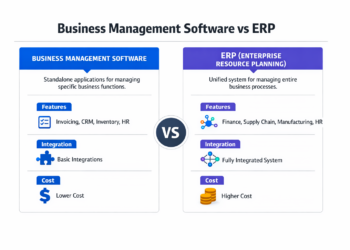
Software categories working independently create as many problems as they solve because isolated systems generate manual work. Your CRM needs customer purchase history from your e-commerce platform.
Your project management system should connect to time tracking. Your accounting software must pull data from payroll, inventory, and invoicing systems.
Integration transforms isolated tools into a cohesive system where data flows automatically rather than requiring manual transfers that introduce errors and create delays.
Businesses now run complex software ecosystems with dozens of specialized tools working in coordination.
What looks like chaos actually works when core systems—accounting, CRM, and project management—connect to the specialized tools they need data from.
While APIs and integration platforms have made connections straightforward, you need intention in building a cohesive stack rather than accumulating disconnected tools.
What Are the Biggest Software Selection Mistakes?
- Buying too many tools too early wastes money on software you’re not ready to use effectively.
Companies excited about automation often purchase sophisticated systems before they’ve documented the processes they’re trying to automate, creating expensive tools that sit unused.
Start with clear operational needs, then find software that addresses those specific gaps.
- Choosing based on popularity rather than need leads to feature bloat—paying for capabilities you don’t need while missing functionality that would actually help your business.
What works for enterprise companies often overwhelms small businesses with complexity. What works for retail businesses might completely miss requirements for service businesses.
Match software to your operational reality, not industry trends or impressive demo videos.
- Ignoring onboarding and adoption means purchasing powerful software that your team never fully implements. The best software in the world delivers zero value if people don’t use it consistently.
Budget time and resources for proper implementation, training, and the adjustment period while people adapt to new systems.
How to Prioritize Software Based on Business Stage
Early-Stage Businesses
Core operations come first:
- Accounting to track financial health
- Basic CRM to manage customer relationships
- Communication tools to coordinate your small team
When launching your first business, prioritize tools that prevent problems—financial visibility, customer tracking, and basic project coordination. Skip sophisticated automation until you’ve validated your business idea and proven your business model actually works. Many bootstrap-friendly business models start with free or low-cost versions of essential tools, upgrading only when limitations create actual business constraints.
Growing Businesses
Automation and scalability matter when manual processes start breaking under volume:
- Add project management software when coordination becomes chaotic
- Implement marketing automation when you can’t manually nurture all your leads
- Invest in time tracking when you need to understand project profitability or optimize team allocation
This is the stage where the 12 categories start becoming relevant—evaluate whether your business is ready for each based on operational pain points rather than arbitrary timelines.
Mature Businesses
Optimization and analytics drive mature business decisions:
- Business intelligence systems help you identify marginal improvements that compound into major competitive advantages
- Advanced inventory management, helpdesk systems, and specialized tools for your industry become worth the investment when you’ve maximized returns from core systems
- Integration between categories becomes critical—mature businesses succeed by making their software ecosystem work seamlessly rather than running individual tools in isolation
RELATED: Business Software for Small Business: The Complete Guide (2026)
Summary: The Software Stack That Defines Modern Businesses
Software infrastructure determines which businesses scale and which stay stuck in manual operations. The 12 categories in this guide aren’t optional extras—they’re the operating system for companies competing in 2026’s economy.
Start with the foundations: accounting, CRM, and project management. Build deliberately based on your business stage and operational needs. Focus on integration that creates a cohesive system rather than accumulated tools.
The business software market’s expansion from $665 billion to a projected $1.83 trillion over the next decade reflects this fundamental reality: software isn’t merely a cost center anymore.
It’s the infrastructure that determines whether you can compete effectively, whether you can scale operations profitably, and whether you’re building a business that creates value beyond what you can personally manage.
Choose strategically, implement thoroughly, and invest in making your software work together rather than just collecting the popular tools everyone else has.
Frequently Asked Questions (FAQs)
What business software should a startup prioritize first?
Accounting software comes first—financial visibility matters from day one. Then add basic CRM to track customer relationships and prevent leads from falling through cracks.
Communication and collaboration tools complete the essential foundation for early-stage businesses.
Skip sophisticated tools until you’ve validated your business model and hit operational constraints that justify additional investment.
Is cloud-based business software better than on-premise solutions in 2026?
Cloud-based software dominates for good reasons: lower upfront costs, automatic updates, and accessibility from anywhere.
On-premise solutions make sense primarily for businesses with strict data sovereignty requirements or specialized security needs.
Most businesses, especially those with under 100 employees, benefit more from cloud software’s flexibility and lower technical overhead than from on-premise control.
How much should a business budget for software annually?
Software spending varies dramatically based on business size, industry, and operational complexity.
Most small businesses spend 3-7% of revenue on software, with technology companies at the higher end and retail at the lower end.
Early-stage businesses can operate on free or low-cost tiers of essential tools for under $500 monthly. Growing businesses with 10-50 employees typically spend $1,500-$5,000 monthly.
Consider the total cost of ownership: purchase price plus implementation, training, and ongoing management time.
What are the biggest mistakes businesses make when choosing software?
Buying based on features rather than actual operational needs wastes money on capabilities you’ll never use. Failing to budget for implementation and training means purchasing software that never gets properly adopted.
Ignoring integration requirements creates disconnected tools that don’t share data, forcing manual work that undermines the efficiency you purchased the software to achieve.
How often should businesses reevaluate their software stack?
Review your core systems annually to ensure they still serve your operational needs as your business evolves.
Evaluate new tools whenever you identify operational bottlenecks or manual processes consuming significant time.
But avoid constant tool-switching—frequent changes create disruption that costs more than imperfect tools.
When software genuinely limits your growth or creates recurring problems, upgrade.
Otherwise, focus on using your current tools more effectively rather than constantly chasing newer options.