Running a small business means juggling operations, customers, finances, and growth simultaneously.
In this balancing act, expensive software bleeding your budget or cheap tools that can’t scale both create problems.
That’s why choosing the right business software on a tight budget isn’t about finding the cheapest option.
It’s about finding tools delivering maximum value without expensive upgrade traps or unused features.
Without this focus, small businesses waste thousands annually on software they don’t need or can’t use.
This guide shows you how to choose business software and evaluate the one that fits your budget today while supporting growth tomorrow.
It teaches you to spot cost-explosion red flags, identify must-have versus nice-to-have features, and build lean software stacks that work.
Key Takeaways:
- Budget-conscious selection requires evaluating the total cost of ownership, not subscription price alone
- Free tools provide serious value when limitations align with actual needs
- Most small businesses need 5-8 core tools, not 20+ disconnected applications
- Integration capabilities impact budgets by reducing manual work and tool sprawl
Why Does Choosing the Right Business Software Matter on a Tight Budget?
The cost of bad software decisions for small businesses
Understanding what’s at stake helps sharpen your decision-making. Wrong software purchases drain budgets through wasted subscription fees, hidden productivity losses, and brutal switching costs.
Organizations with 100-200 employees waste an average of $89,033 annually on unused software, while companies with over 200 staff waste 48% of their software budget. That’s not enterprise-only waste; it scales down proportionally.
Beyond the obvious subscription waste, poor software creates hidden productivity costs. Your team spends hours on manual workarounds, duplicate data entry, and fighting with tools that don’t talk to each other.
McKinsey research shows knowledge workers waste 20% of their time searching for information and tracking down colleagues.
Migrating data, retraining staff, and rebuilding workflows when you pick the wrong tool can cost more than the software itself.
Many businesses stay locked into expensive, inadequate software simply because switching feels impossible.
Budget constraints vs operational reality
Those switching costs hit harder when budgets are already stretched. Small businesses allocate 2-7% of annual revenue to IT, averaging 4-6.9% depending on industry. Businesses with 10-49 employees budget $125-175 per employee monthly for comprehensive software.
Within that budget, they must cover accounting, CRM, project coordination, communication, marketing, and potentially e-commerce or support. The math gets tight quickly, making strategic software selection essential.
Software as a leverage tool, not a luxury
Rather than viewing software as an expense to minimize, understanding its leverage potential changes your selection approach. Accounting software enables accurate pricing of your services and prevents cash flow disasters. Quality CRM systematically converts leads into customers. These tools function like business equipment investments that multiply your capacity without adding headcount.
These examples illustrate how software provides leverage when it automates tasks, reduces errors, and scales without adding employees.
The U.S. Small Business Administration notes that good software enables businesses to increase sales by saving time and money while expanding capacity.
The principles that emerge from this perspective include focusing on must-have functionality over features, prioritizing integration capabilities to prevent tool sprawl, evaluating total cost of ownership beyond monthly subscriptions, and choosing vendors with predictable pricing models.
What Business Needs Should You Understand Before Looking at Software?
Clarifying your business model and growth stage
Service businesses hitting capacity limits need scheduling and invoicing to prevent revenue leakage.
Product businesses losing inventory accuracy require management systems before stockouts kill customer trust.
Consulting firms struggling with proposal tracking need systems that capture conversations and commitments.
Growth stage matters equally, since starting a home-based business requires minimal software, while businesses planning expansion need scalable tools.
That’s why you should align selection with your comprehensive business plan. If forecasting doubled revenue within 18 months, free tools with strict limits will create bottlenecks.
Identifying core operational pain points
Invoicing that consumes hours each week costs more than the revenue it documents. Lost customer conversation threads mean repeated work and damaged relationships. Missing project deadlines erodes client confidence faster than any competitor could.
Track where teams spend time on repetitive tasks, where errors occur, and where customer complaints cluster.
Each pain point maps to software categories. Time-consuming invoicing needs accounting. Lost conversations need CRM. Missed deadlines need project management.
Once you’ve identified these patterns, buy software to solve these documented problems, not hypothetical ones that might emerge someday.
Separating must-have vs nice-to-have features
Must-have features solve identified pain points or meet legal compliance requirements. Nice-to-haves improve convenience without changing operations fundamentally.
Essential features include:
- Core functionality solving primary pain points
- Legal/regulatory compliance features
- Capabilities for generating or protecting revenue
- Security protecting customer or financial data
Important features include:
- Automation saves significant weekly time
- Integration with essential tools
- Reporting and informing key decisions
- Features noticeably improve customer experience
Nice-to-have features include:
- Advanced customization
- Premium support tiers
- Emerging features without proven ROI
- Aesthetic improvements without functional benefit
To put this framework into practice, apply it across every business function before evaluating specific tools:
| Business Function | Required Capabilities | Optional Enhancements |
| Financial | Income/expense tracking, invoicing, tax prep | Multi-currency, advanced reporting, payroll |
| Customer Relations | Contact management, communication history | Marketing automation, lead scoring, analytics |
| Project Delivery | Task assignment, deadlines, and collaboration | Gantt charts, resource allocation, and time tracking |
| Communication | Email, video, file sharing | Advanced integrations, unlimited storage, and AI |
| Marketing | Email campaigns, basic analytics, and landing pages | A/B testing, multi-channel campaigns, and AI optimization |
Based on this framework, start with essentials only. Your business plan template should indicate which capabilities drive revenue versus marginal improvements.
What Types of Business Software Do Small Businesses Actually Need?
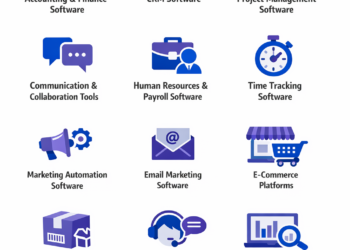
Accounting and finance software
Understanding why accounting comes first in any software discussion is simple: financial chaos kills more small businesses than competition does.
You need accurate income and expense tracking, professional invoicing, tax-ready reports, and bank account integration.
Financial software should be prioritized first for business health, according to industry experts.
Strong options span from free (Wave) to paid (QuickBooks, FreshBooks, Xero), with the right choice depending on transaction volume, complexity, and whether you need payroll features.
Businesses with under 25 transactions monthly can often thrive on free accounting software. Higher volumes justify paid tools with better automation.
CRM tools
Once your financial foundation is solid, customer relationship management becomes the next priority.
Scattered contact information living in email threads, sticky notes, and memory doesn’t scale past a dozen customers.
Customer relationship management software transforms this chaos into systematic sales processes with contact organization, communication history, deal pipeline tracking, and basic reporting.
Many businesses start with free CRM options like HubSpot’s free tier before upgrading as their sales process matures.
CRM spending is projected to reach $70 billion by 2025, reflecting how central these tools have become to business operations.
Project and task management software
As customer relationships grow, so does the complexity of delivering on commitments. Work falls through cracks when teams lack shared visibility into who’s doing what by when.
Task creation and assignment, deadline management, file attachment, and basic team collaboration prevent this operational breakdown.
Free options like Trello or Asana’s basic plans handle most small business needs.
Paid upgrades become worthwhile when you need advanced automation, dependency tracking, or integration with specialized industry tools.
Communication and collaboration tools
Managing projects effectively requires a strong communication infrastructure. Email remains essential, but modern businesses add video conferencing and team messaging to reduce response lag and clarify complex discussions.
Collaboration software spending exceeds $30 billion annually as remote and hybrid work normalize.
Many communication tools offer generous free tiers. Google Workspace or Microsoft 365 provides integrated email, storage, and productivity tools. Slack offers free team messaging with limitations. Zoom provides free video calls with time restrictions.
Marketing and email software
With solid operations and communication established, systematic customer outreach becomes possible. Customer lists sitting unused in spreadsheets represent wasted revenue opportunity. Contact list management, email campaign creation, basic automation, and performance tracking turn contacts into revenue streams through systematic nurturing.
Many email platforms offer free tiers for smaller contact lists. Businesses typically upgrade when they exceed 500-1000 contacts or need advanced segmentation and automation features.
E-commerce and payment tools
For businesses selling products or services directly, payment infrastructure is non-negotiable. Accepting payments through informal channels looks unprofessional and creates accounting nightmares. If you sell products or accept payments, you need secure payment processing, basic inventory tracking, order management, and customer data security.
Options range from simple payment buttons (Square, Stripe) to full e-commerce platforms (Shopify, WooCommerce). Your choice depends on product complexity, sales volume, and whether you need physical and digital sales capabilities.
Customer support software
As your customer base grows, support infrastructure becomes critical. Support requests buried in personal email inboxes create response delays and lost tickets as business scales. Basic ticketing systems organize customer questions, track response times, and maintain support history, preventing these failures.
Many businesses start with shared email inboxes before upgrading to dedicated support software. Free options exist, but paid tools ($15-50/user/month) provide better workflow automation and reporting.
Priority ranking for most small businesses
Resource allocation follows operational dependency, not feature appeal. Accounting software comes first because financial chaos creates existential risk from day one. CRM becomes essential once you have more than 10 regular customers whose relationships generate repeating revenue. Communication and collaboration tools matter for teams of two or more where coordination overhead exceeds tool costs.
Project management becomes essential when managing five or more concurrent projects where delivery timing affects customer satisfaction or revenue. Email marketing proves important when you have 50 or more contacts worth nurturing systematically. E-commerce and payment tools only matter if selling products. Customer support grows important when receiving 10 or more support requests weekly where response quality affects retention.
The lean stack principle that emerges from this analysis is straightforward: Start with 3-5 core tools covering accounting, customer management, and communication. Add other categories only when current pain points justify the investment.
Free vs Paid Software: What Does “Free” Really Mean?
Freemium, trials, and open-source models
Before evaluating specific tools, understanding different “free” models prevents unpleasant surprises. Businesses choosing free accounting software discover at tax time that export functions require paid upgrades. Trial users investing hours learning software hit paywalls when trials expire. These surprises stem from not understanding what “free” actually means.
Freemium tools offer basic functionality permanently free with paid upgrades available. Free trials provide full access temporarily, reverting to paid-only after the trial period. Open-source software is free to use but may require technical expertise to implement and maintain.
Freemium works when free tier limitations align with your actual usage. Free trials help you test before committing but require planning to evaluate effectively. Open-source solutions offer maximum flexibility but demand either technical skills or budget for implementation support.
Hidden limitations in free plans
Free accounting software that caps monthly transactions at 20 becomes unusable as you grow. Free CRM limiting you to 100 contacts forces expensive migrations when you hit 101. Free project management without guest access prevents client collaboration.
Free software typically restricts user count, feature access, support availability, data storage, or usage volume. These limitations aren’t inherently bad; they’re business models that subsidize free users through paid customer revenue.
Before committing to free tools, read limitation details carefully and ask: Will I hit these limits within six months? Does the paid upgrade cost align with my budget? Can I export my data if I need to switch?
When paying saves money long-term
The calculus changes when you factor in time costs. Free software requiring five hours weekly to manage manually costs more than paid software saving 10 hours through automation. Developers using paid tools complete tasks 55% faster than those using free alternatives. Employees save up to 122 hours annually by automating routine tasks with paid software.
Consider total cost of ownership beyond subscription fees. Free tools lacking critical integrations force duplicate data entry that paid, integrated solutions eliminate.
Customer support matters for budget-conscious businesses. Free software typically offers community forums only. When you’re stuck, paid software provides direct technical support that can save days of troubleshooting.
| Consideration | Free Software Advantage | Paid Software Advantage |
| Upfront Cost | $0 initial investment | Predictable monthly/annual budgeting |
| Feature Access | Core functionality often sufficient | Advanced automation and customization |
| Support | Community forums | Professional technical support |
| Scalability | Limited growth capacity | Designed to scale with business |
| Integration | Limited or no integrations | Robust API and native integrations |
| Data Ownership | Export limitations possible | Full data portability guaranteed |
| Security | Basic security measures | Enterprise-grade security and compliance |
The strategic approach that balances these trade-offs involves using free tools for non-critical functions where limitations don’t constrain operations, while paying for software in areas where time savings, automation, or integration justify subscription costs. Calculate ROI: If software saves more hours than it costs, it pays for itself.
What Key Factors Should You Evaluate When Choosing Budget-Friendly Business Software?
Total cost of ownership
A $10/month tool requiring 40 hours of setup and training costs significantly more than a $50/month tool offering migration assistance and intuitive onboarding. Subscription price represents only the visible portion of actual costs.
Total cost of ownership includes:
- Setup and implementation fees
- Data migration costs from previous systems
- Training time for staff
- Customization or configuration needs
- Integration development or third-party connectors
- Support and maintenance contracts
- Upgrade costs as you grow
- Potential switching costs if you leave
Calculate first-year total cost including all these factors, not just 12 monthly payments.
Scalability without forced upgrades
Software that jumps from $29/month supporting 5 users directly to $299/month supporting 50 users creates a painful upgrade wall. That 5x price increase for 10x capacity forces businesses to absorb massive cost jumps at vulnerable growth stages. Businesses using 106 SaaS applications on average face constant upgrade pressures from poorly designed pricing tiers.
Look for pricing that increases proportionally with usage (per-user, per-transaction) rather than arbitrary tier jumps. Better pricing models offer $29/month plus $5 per additional user, allowing smooth scaling aligned with revenue growth.
Ease of use
Enterprise tools designed for large corporations often overwhelm small teams with unnecessary complexity, according to the U.S. Small Business Administration. Complex software creates hidden costs through extended training time and ongoing support needs.
Test software yourself during free trials. If you can’t figure out core functions within 30 minutes, your team will struggle. User-friendly interfaces reduce learning curves and maximize efficiency. Strong documentation and tutorial libraries indicate vendor commitment to user success.
Integrations
Manual data transfers between systems waste time and introduce errors with every copy-paste operation. Integration capabilities determine whether your software stack works together or fights against you.
The SBA recommends looking for software listing third-party integrations on their websites and avoiding custom integration development. Prioritize software that integrates with tools you already use. Accounting software that connects to your bank automatically is worth more than standalone tools requiring manual transaction entry. CRM integrating with your email saves hours of copy-paste work.
Key integration patterns include:
- Accounting connecting to bank accounts and payment processors
- CRM syncing with email and calendar
- Project management linking to time tracking and accounting
- Marketing tools integrating with CRM and analytics
- E-commerce connecting to accounting and inventory systems
Support and documentation
Budget constraints make support quality critical. You can’t afford extended downtime or hours troubleshooting alone. Evaluate documentation quality and accessibility, response time commitments, support channels offered (email, phone, chat), community forum activity levels, and knowledge base comprehensiveness.
Test support during free trials. Submit a question and measure response quality and speed. Active vendor communities often provide faster answers than formal support tickets for common questions.
Data ownership and portability
Vendor lock-in through proprietary data formats creates expensive traps. Budget-conscious businesses need exit strategies when tools underperform or pricing becomes unsustainable.
Before committing, verify you can export your complete data in standard formats (CSV, JSON, XML), export includes all fields and relationships, no export fees or restrictions apply, and data remains accessible after subscription ends. Poor data portability forces you to stay with inadequate vendors or lose years of business data during transitions.
Red flags that signal cost traps
Watch for these warning signs:
- Aggressive upselling during trial periods pressures upgrades before evaluating free tiers thoroughly
- Unclear pricing tiers using vague “contact us for pricing” hide costs until you’re invested
- Feature-gating essential functionality behind expensive enterprise tiers inflates costs for basic operations
- Per-seat minimums force purchase of 10 seats when you need 3
- Automatic renewal without notification creates surprise charges with difficult cancellation processes
- Limited data export capabilities make leaving painful even when necessary
- Frequent unannounced price increases show vendor history of 20%+ annual price hikes
- Poor integration ecosystems force expensive custom development to connect tools
Your evaluation checklist should include:
- Calculating true 12-month costs including all fees
- Testing core features during free trial
- Verifying integration with existing tools
- Confirming data export capabilities
- Researching vendor’s pricing stability and customer reviews
How to Compare Business Software Without Getting Overwhelmed
Shortlisting efficiently
Evaluating 30 tools wastes weeks and creates analysis paralysis without improving decision quality. Use software review platforms filtering by your business size, industry, and budget constraints. Prioritize tools with strong ratings specifically from businesses similar to yours.
Review platforms like G2, Capterra, and Software Advice provide filtered searches and comparison features. Focus on reviews from businesses in your size range (under 50 employees, under $5M revenue) facing similar operational challenges.
Start with 3-5 options maximum covering essential functions.
Using reviews and comparisons correctly
Five-star ratings from enterprise users tell you nothing about small business performance. Dig into specific review categories: ease of use, customer support, value for money, and reliability. Read 3-star reviews carefully; they typically provide balanced perspectives highlighting both strengths and legitimate weaknesses.
Look for testimonials from businesses like yours in similar industries and sizes trying to solve similar problems. Software working perfectly for enterprise companies may frustrate small businesses. Industry-specific feedback reveals workflow compatibility.
Avoiding feature overload bias
Software with 200 features sounds impressive until your team spends two months learning 20 they’ll actually use. More features don’t equal better software. Feature overload creates complexity that slows your team and increases training costs.
Focus relentlessly on whether software solves your identified pain points efficiently. Create a simple evaluation matrix: List your 5-8 must-have capabilities as rows. List your shortlisted software options as columns. Score each option (1-5) on how well it delivers each capability. Include ease of use and pricing as evaluation factors. The highest total score wins, not the longest feature list.
Running effective free trials
Trial periods range from 7 days to 6 weeks across reputable software options. Wasting those days browsing menus means deciding based on incomplete information. Create a structured evaluation plan focusing on must-have features and real business tasks.
Free trial evaluation plan:
- Day 1: Initial setup and data import
- Days 2-3: Test core features with real data
- Days 4-5: Evaluate integration with existing tools
- Days 6-7: Gather team feedback and test support quality
If struggling near trial end, request extensions before expiration.
| Evaluation Criteria | Weight | Software A Score (1-5) | Software B Score (1-5) | Software C Score (1-5) |
| Solves Primary Pain Point | 30% | |||
| Ease of Use | 20% | |||
| Integration Capabilities | 20% | |||
| Total Cost of Ownership | 15% | |||
| Support Quality | 10% | |||
| Scalability | 5% | |||
| Weighted Total | 100% |
The systematic approach involves:
- Defining must-have features clearly before researching options
- Limiting shortlist to 3-5 viable options
- Testing with real business scenarios during trials
- Involving team members who’ll use software daily
- Making decisions based on evaluation matrix, not feature lists
What Mistakes Do Small Businesses Make When Choosing Software on a Budget?
Choosing based on price alone
Free software requiring 10 weekly hours of manual work costs more than $100/month paid software saving those hours. The cheapest option rarely delivers best value when productivity losses exceed subscription savings.
Focus on cost per outcome achieved, not sticker price. Calculate time savings monetarily. If software saves 5 hours weekly and your effective hourly cost is $50, that’s $1,000 monthly value. Paying $200/month for that outcome makes financial sense.
Overbuying enterprise tools
Employees wearing six hats lack time to master overly complex enterprise software. Enterprise software designed for corporations with dedicated IT departments overwhelms small teams with unnecessary complexity. Small businesses typically allocate 2-7% of annual revenue to IT. Enterprise software often demands 10-15% to implement and maintain properly.
The SBA warns that getting more features and functionality can leave small teams worse off due to complexity.
Ignoring future needs
Software handling 5 employees smoothly may collapse under 15. Free tiers supporting 100 customers become unusable at 101. Planning only for today creates expensive migrations tomorrow.
Consider where your business will be in 12-18 months. Ask vendors directly: How does pricing change as we grow? What’s the upgrade path? Are there usage caps that would force migration? Understanding the roadmap prevents painful surprises.
Tool sprawl
Each problem solved with a new app rather than maximizing existing software capabilities drives organizations to waste 34-48% of software budgets on unused or redundant tools. Many businesses discover their CRM includes email marketing they’re paying separately for elsewhere. Project management tools often include time tracking, communication, and file sharing, eliminating needs for separate apps.
Before buying new software, verify existing tools can’t solve the problem.
Long-term contracts too early
Annual commitments offer discounts (typically 15-20% off monthly pricing) but trap you if the software doesn’t work. Never commit to annual contracts during evaluation phases.
Start with month-to-month pricing. Convert to annual billing only after 3-6 months of successful usage proves the software’s value.
Costly mistakes to avoid
Common mistakes include:
- Buying software before clearly identifying the problem it should solve, which leads to unused subscriptions draining budgets
- Selecting tools that don’t integrate with your existing software stack forces manual workarounds that negate efficiency gains
- Committing to annual contracts without adequate trial periods locks you into inadequate solutions
- Purchasing seats or capacity far beyond current needs wastes capital on unused licenses
Additional pitfalls include:
- Ignoring total cost of ownership beyond monthly subscriptions, which creates budget surprises during implementation
- Choosing software your team finds too complex to use effectively means paying for tools that slow operations rather than accelerate them
- Failing to verify data export capabilities before committing creates expensive vendor lock-in
- Overlooking vendor stability and long-term viability risks investing in platforms that disappear
The lessons learned from these mistakes are clear:
- Solve problems, don’t buy tools
- Start small, scale as needed
- Month-to-month until proven
- Integration prevents proliferation
- Calculate total costs, not just subscriptions
What Are Some Sample Low-Budget Software Stacks for Small Businesses?
Solo entrepreneur stack
Solopreneurs and freelancers with minimal team collaboration needs can handle core operations for $0-30 monthly while maintaining professional capabilities.
Tools:
- Accounting: Wave (free)
- Email & Productivity: Gmail or Google Workspace free tier
- Scheduling: Calendly free
- Marketing Graphics: Canva free
- Payments: PayPal or Stripe (percentage-based fees only)
Total estimated cost: $0-30/month
Upgrade when:
- You hit 25+ transactions monthly (upgrade accounting)
- Need advanced email features (upgrade to Google Workspace paid)
- Require professional branding assets (upgrade Canva)
- Add first employee or contractor (add communication tools)
Service-based business stack
Consulting, agencies, and professional services with 3-10 team members need more coordination but can balance free tools with affordable paid options where integration and automation justify costs.
Tools:
- Accounting: QuickBooks Simple Start or FreshBooks Lite ($15-20/month)
- CRM: HubSpot free
- Project Management: Trello or Asana free
- Team Communication: Slack free
- Email & Collaboration: Google Workspace Business Starter ($6/user/month)
- Scheduling: Calendly Essentials ($10/month if needed)
Total estimated cost: $50-100/month depending on team size and scheduling needs
Upgrade when:
- You exceed free CRM limits (upgrade to HubSpot Starter $45/month)
- Need advanced project features (upgrade Asana/Trello approximately $10/user)
- Require advanced automation and reporting
E-commerce stack
Product-based businesses needing inventory, payments, and customer management face costs that scale with revenue through percentage-based fees rather than fixed subscriptions.
Tools:
- E-commerce Platform: Shopify Basic ($39/month)
- Accounting: QuickBooks or Xero ($15-30/month)
- Email Marketing: Mailchimp free tier (up to 500 contacts)
- Customer Support: Zendesk free or Freshdesk free
- Social Media Management: Later.com or Buffer free tier
Total estimated cost: $50-70/month in subscriptions plus payment processing fees (typically 2.9% + $0.30 per transaction)
Upgrade when:
- You exceed 500 email contacts (upgrade Mailchimp)
- Need advanced inventory features (upgrade Shopify)
- Require multichannel support capabilities (upgrade customer service software)
Budget benchmarks across business types
| Business Type | Monthly Software Budget | Core Tools | Primary Trade-off |
| Solo Entrepreneur | $0-30 | Accounting, email, scheduling | Limited automation, manual processes |
| Service Business (3-10 people) | $50-100 | Accounting, CRM, project management, communication | Free tier limitations, basic features only |
| E-commerce (product-based) | $50-70 + transaction fees | E-commerce platform, accounting, email marketing | Percentage-based fees scale with revenue |
| Growing Business (10-25 people) | $200-400 | Full paid stack with integrations | Higher upfront costs justified by automation ROI |
Solo operations can run on under $50/month. Small teams (3-10 people) typically need $100-200/month. Growing businesses (10-25 people) should budget $200-400/month for comprehensive software coverage. Remember: These exclude payment processing fees, which scale with revenue.
When and How to Upgrade as Your Business Grows
Upgrade signals
Marketing emails from vendors don’t indicate upgrade necessity. Upgrade when hitting concrete operational limits indicating free or basic tools now constrain growth rather than support it.
Upgrade when you’re experiencing:
- Regularly exceeding free tier usage limits signals outgrown capacity
- Manual workarounds consuming 5+ hours weekly cost more than paid upgrades
- Feature limitations preventing process improvements block operational efficiency
- Team members expressing consistent frustration with tools indicate usability problems degrading productivity
- Missing sales opportunities due to tool limitations means software costs you revenue
- Security or compliance requirements demanding advanced features create legal or risk management pressure
If you’re working around tool limitations rather than with tools working for you, it’s upgrade time.
Managing migrations
Data loss, workflow disruption, and productivity hits during transitions terrify small businesses considering software migrations. Minimize pain through systematic approaches.
Migration best practices:
- Export complete data from old systems early, even before finalizing new tool selection
- Test new software with real data during trials
- Run old and new systems parallel for 2-4 weeks before full switchover
- Train team members incrementally, not in marathon sessions
- Document new workflows as you build them
- Keep old system read-only accessible for 30-60 days post-migration
Most modern software offers migration assistance or even white-glove migration services for paid tiers.
Investing in migration support often saves more than it costs by preventing data issues and reducing downtime.
Incremental budgeting
As you scale from $100K to $500K annual revenue, your software budget might grow from $200/month to $800/month while maintaining the 2-4% of revenue ratio. Software budgets should grow with revenue, not fixed percentages of initial budgets.
Budget for one major upgrade annually based on the biggest pain point. Spreading upgrades prevents budget shock while systematically improving operational efficiency.
Create software upgrade reserve funds during profitable quarters to smooth costs during transitions.
67% of SMBs actively prioritize digital transformation budgets, recognizing software as an investment, not an expense. As businesses expand, 54% rely on SaaS for core processes, and 62% prefer cloud-native platforms enabling scalability.
The approach to sustainable scaling involves:
- Monitoring usage patterns monthly to spot approaching limits early
- Budgeting 10-15% annual increases for software as revenue grows
- Upgrading one major system yearly rather than everything simultaneously
- Evaluating ROI quarterly to ensure paid tools deliver promised value
Final Software Selection Checklist for Small Businesses on a Tight Budget
Before committing to any business software, apply these filters to eliminate poor choices and identify sustainable solutions:
Needs alignment:
- [ ] Software directly solves your identified pain points, not hypothetical future problems
- [ ] Core features match your must-have list from the needs assessment
- [ ] Complexity level appropriate for your team’s technical capability
- [ ] Industry-specific requirements met if applicable
Cost evaluation:
- [ ] Total first-year cost calculated including setup, training, and integration
- [ ] Pricing model sustainable as business grows (no massive tier jumps)
- [ ] No hidden fees for essential features like data export or API access
- [ ] Month-to-month option available initially
Scalability:
- [ ] Clear upgrade path as team or usage grows
- [ ] Pricing scales gradually, not in huge jumps
- [ ] No artificial limits forcing premature upgrades
- [ ] Vendor demonstrates stability and long-term viability
Usability:
- [ ] Team members can operate core features after 30-minute training
- [ ] Interface intuitive for non-technical users
- [ ] Mobile access if needed for field operations
- [ ] Documentation and tutorials are comprehensive
Support and integration:
- [ ] Connects with existing critical tools (accounting, email, etc.)
- [ ] Support channels match your needs (email/chat/phone)
- [ ] Active user community or knowledge base available
- [ ] Data export available in standard formats without restrictions
The decision framework that ties these criteria together is straightforward: Software should solve today’s problems while accommodating tomorrow’s growth.
Start conservatively with free or low-cost options. Upgrade only when clear operational limits justify investment. Integration capabilities often provide more value than advanced features.
Conclusion
Choosing business software on tight budgets requires systematic evaluation, not guesswork.
Focus on solving real problems with tools that integrate well, scale affordably, and deliver measurable value.
Start lean, measure results, and upgrade strategically as growth justifies investment. Your software stack should empower operations, not complicate them.
Take time to explore business ideas and match your software choices to your specific business model and growth trajectory.
Frequently Asked Questions
What is the cheapest way to get business software?
Freemium tools offering permanent free tiers meeting your core needs provide the foundation.
Many established platforms like HubSpot CRM, Wave Accounting, Trello, and Slack provide genuinely useful free versions supporting small businesses indefinitely.
Take advantage of free trials strategically. Create evaluation plans testing real business scenarios before trials expire. Many vendors extend trials upon request if you’re actively evaluating.
Consider open-source alternatives if you have technical resources. Options like Odoo (ERP), ERPNext, and various WordPress plugins provide powerful functionality free or at low cost, though they may require setup expertise.
The absolute cheapest approach combines free tools strategically: Wave for accounting, Gmail for email, Google Calendar for scheduling, Google Drive for storage, and Slack free for team communication. This stack handles core operations for $0 monthly while maintaining professional capabilities.
Is free software safe for small businesses?
Reputable providers like Google, Microsoft, HubSpot, and Slack stake their reputations on security. Free software from established vendors with clear business models (freemium, open-source) is generally safe.
Evaluate safety through several factors: Does the vendor clearly explain their business model? Do they publish security and privacy policies? Have they been in business for 3+ years? Do they serve other businesses you recognize? Are there independent security audits or certifications?
Unclear privacy policies create risk. Requests for excessive permissions signal potential data misuse. Lack of encryption for sensitive data exposes you to breaches.
No clear business model explaining how they sustain free offerings raises sustainability questions. Vendors without verifiable track records may disappear suddenly.
Free doesn’t automatically mean unsafe, nor does paid guarantee security. Many free business tools meet enterprise-grade security standards because vendors need trust to convert free users to paid customers eventually.
How many tools should a small business start with?
Most small businesses need accounting software, a communication tool (email/messaging), and either CRM or project management, depending on whether they’re customer-facing or delivery-focused. Start with 3-5 core tools covering essential functions.
Adding tools beyond this core should require clear justification. Each additional tool adds complexity, training time, and potential integration headaches.
Tool sprawl happens when businesses add software reactively without considering whether existing tools could solve new problems.
Scale from 3-5 tools to 8-10 tools gradually over your first 2-3 years as operations genuinely require additional capabilities.
Businesses averaging 106 SaaS applications typically waste significant resources on redundant or unused tools.
Can one tool replace multiple business software solutions?
All-in-one platforms like Monday.com, Zoho One, or Microsoft 365 promise complete business management in a single tool. They work best when starting fresh without existing software investments.
Trade-offs exist. All-in-one tools offer convenience and integration but typically provide less powerful individual capabilities than specialized best-of-breed tools.
You get adequate project management, decent CRM, and passable accounting rather than excellent solutions in each area.
Consider all-in-one platforms if you prioritize simplicity over optimization, have limited technical expertise, need everything immediately, and haven’t invested heavily in specialized tools yet.
Most businesses thrive with hybrid approaches: a core all-in-one platform (like Google Workspace or Microsoft 365) for basics, plus 2-4 specialized tools for critical functions requiring power features.
How often should small businesses review their software stack?
Quarterly reviews catch approaching limits before they become crises and identify unused subscriptions bleeding budgets unnecessarily. Conduct formal software reviews quarterly, examining usage patterns, costs, and whether tools still solve core problems effectively.
Annual deep reviews should evaluate total software spend as a percentage of revenue, assess whether tools integrate effectively, identify redundancies and gaps, and consider major upgrades or replacements for underperforming tools.
Monthly quick checks prevent surprise billing issues. Review statements for unexpected charges, verify user counts match active employees, and confirm storage and usage stay within plan limits.
Market changes happen fast. 48% of SMBs plan increased cybersecurity spending, 49% adopt AI features, and vendor pricing models shift frequently. Regular reviews ensure your stack evolves with both your business and the software landscape rather than accumulating expensive technical debt.