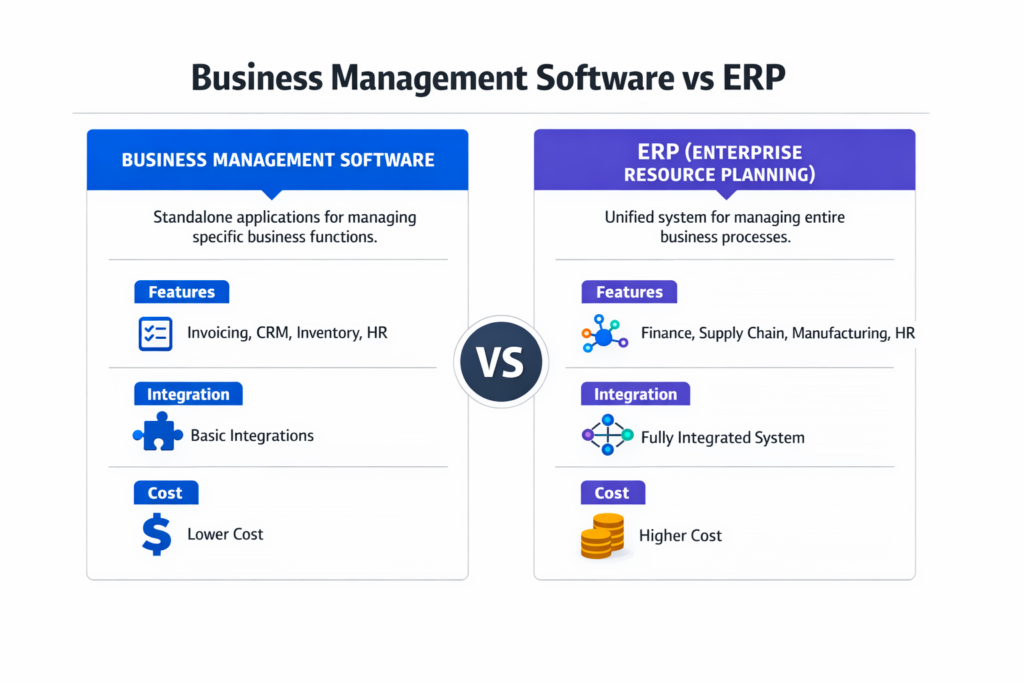
Business management software runs separate tools for accounting, inventory, and CRM, while ERP integrates everything into one system with a shared database.
Both systems solve real problems, though in different ways. Business management software gets you operational quickly with lower costs. ERP eliminates data silos and scales with complex operations.
This architectural difference matters because choosing wrong costs you twice: once for implementation and again for replacement when you outgrow it.
This guide uncovers the architectural differences between business management software vs ERP that actually matter for decision-making, specific revenue and complexity thresholds showing when to choose each option, real total cost breakdowns including hidden expenses vendors don’t mention, and scenario-based decisions for service businesses, product businesses, and rapid-growth startups.
Key Takeaways:
- Business management software uses modular apps with integrations; ERP uses one unified database, eliminating data conflicts
- Costs range from $2,000-$50,000 yearly for business management software to $50,000-$500,000+ for ERP implementation
- Most businesses transition between $5 and $10 million in revenue when operational complexity exceeds modular tool capabilities
- The right choice matches your current complexity while accommodating realistic 24-month growth projections
Business Management Software vs ERP: Definitions and Core Concepts
What Is Business Management Software?
Business management software provides specialized tools that handle specific functions, including accounting, inventory tracking, customer relationship management, and project management.
You might use QuickBooks for accounting, separate inventory software for stock management, and a standalone CRM for customer data, each reducing errors and automating tasks within its domain.
Typical users and business stage
Business management software is ideal for companies earning between $ 500,000 and $10 million annually, particularly service businesses with minimal inventory, single-location operations, and teams of fewer than 50 employees.
You’re running separate systems that work independently, with data flowing through manual exports, CSV files, or basic integrations.
Capabilities at a glance:
- Basic accounting and bookkeeping
- Invoicing and billing
- Expense tracking and reporting
- Contact and customer management
- Simple inventory tracking
- Task and project management
- Time tracking and payroll processing
What Is ERP (Enterprise Resource Planning) Software?
ERP systems integrate all business processes into one unified platform with a centralized database.
When someone enters a sales order, that single entry automatically updates inventory levels, triggers production scheduling, adjusts financial forecasts, and updates customer records—all in real time without manual intervention.
Centralized data architecture explained plainly
The fundamental architectural difference: business management software stores data in separate databases that occasionally sync with each other.
ERP stores everything in one database that all departments access simultaneously.
When your warehouse ships a product, the ERP instantly reflects that change in inventory, cost of goods sold, accounts receivable, and customer order status, ensuring everyone sees the same numbers simultaneously.
This eliminates syncing delays and version conflicts that plague multi-system environments.
Capabilities at a glance:
- Financial management and general ledger
- Supply chain and procurement
- Manufacturing and production planning
- Warehouse and inventory management
- Order management and fulfillment
- Human resources and payroll
- Customer relationship management
- Business intelligence and reporting
- Quality management systems
Business Management Software vs ERP: Architectural Differences Between Business Management Software and ERP
Modular vs Unified Systems
Business management software takes a modular approach. You pick individual applications for specific needs, connect them through integrations when possible, and accept that some data lives in isolation. Each system maintains its own database, user interface, and update schedule, creating management overhead.
ERP uses unified architecture. One platform, one database, one source of truth. All modules run on the same infrastructure and share data instantly without replication or synchronization delays.
Key architectural contrasts:
| Aspect | Business Management Software | ERP System |
| Data storage | Multiple databases across separate applications | One centralized database shared across all modules |
| Updates | Each system updates separately with varying schedules | Platform-wide updates deployed simultaneously |
| Access control | Separate logins and permissions per tool | Role-based access across all functions from one interface |
| Customization | Limited to individual app capabilities | Enterprise-wide customization through configuration or development |
These architectural contrasts create cascading differences in how you manage, maintain, and scale your systems.
Data Flow and System Integration
Business management software relies on point-to-point integrations. Your accounting software connects to your e-commerce platform through an API that you maintain separately from your inventory-to-shipping sync. When integrations break, data stops flowing, and you’ll discover discrepancies weeks later during the month-end close.
ERP eliminates integration complexity through native data flow. Enter information once, and it propagates everywhere automatically. The system enforces business rules consistently, prevents duplicate data entry, and maintains referential integrity across all operations.
This explains why ten loosely connected tools don’t equal one integrated system. System coherence (the architectural unity that enables real-time data flow and consistent business rules) delivers value beyond feature checklists.
The following comparison highlights where architectural differences create operational impact:
| Aspect | Business Management Software | ERP System |
| Data entry | Multiple times across different systems | Enter once, flows everywhere |
| Real-time access | Limited; depends on sync frequency | Immediate across all modules |
| Data conflicts | Common during sync failures | Eliminated through single database |
| Reporting | Requires data aggregation from multiple sources | Unified reporting across all functions |
| Audit trail | Fragmented across systems | Complete transaction history in one place |
Business Management Software vs ERP: Feature-by-Feature Comparison
Accounting and Financial Management
| Capability | Business Management Software | ERP System |
| Core functions | Invoicing, expense tracking, AP/AR, basic reporting | Multi-entity accounting, intercompany transactions, advanced revenue recognition |
| Financial depth | Single-entity bookkeeping | Detailed cost accounting, real-time consolidated reporting across business units |
Business management software handles straightforward accounting requirements effectively. ERP provides comprehensive financial management necessary for complex organizational structures.
Operations and Workflow Management
Business management software offers task management and basic workflow automation within individual applications. You’ll set up approval workflows for purchase orders in one system and customer service workflows in another, while ERP delivers enterprise-wide workflow automation through configurable business rules that span departments, automatically routing purchase orders based on amount thresholds while applying credit holds when customers exceed limits and requiring sales management approval for special pricing—all enforced consistently across the organization.
CRM and Customer Data
Business management software provides standalone CRM functionality focused on contact management, sales pipeline tracking, and basic marketing automation. Your customer data typically lives separately from order history and support tickets, even with integrations connecting the systems.
ERP integrates customer relationship management with complete operational context. Sales reps see real-time inventory availability, outstanding invoices, support ticket history, and shipment status—all from the customer record without switching systems.
Inventory and Supply Chain
| Scope | Business Management Software | ERP System |
| Inventory tracking | Stock levels, basic movements | Multi-location with real-time visibility |
| Supply chain | Limited to single-location management | Automated replenishment, demand forecasting, lot/serial tracking |
| Warehouse operations | Basic stock counts | Bin locations, warehouse management, cross-docking |
Business management software tracks inventory adequately for businesses managing a few hundred SKUs in one location. ERP handles complex supply chain coordination from suppliers through fulfillment.
Reporting and Analytics
Business management software provides standard reports within each application. Analyzing how inventory turnover affects cash flow requires exporting data to spreadsheets and building your own analysis.
ERP delivers comprehensive reporting spanning all business functions with custom report builders for ad-hoc analysis, predictive analytics applying statistical methods to forecast outcomes, and multi-dimensional analysis slicing data across time, customers, products, and locations without manual effort.
Automation and Customization
Business management software offers limited automation within application boundaries and minimal customization without technical expertise.
ERP enables extensive automation through workflow engines and deep customization via configuration or custom development. This depth of customization means you can adapt the system to your business processes rather than forcing your business to match the software.
Summary of operational differences:
| Feature | Business Management Software | ERP System |
| Implementation time | Weeks to months | 3-12+ months |
| Scalability | Limited by app capabilities | Designed for growth |
| User training | Moderate per application | Significant upfront |
| Maintenance | Per-application updates | Centralized updates |
| Data ownership | Distributed across vendors | Single platform control |
Business Management Software vs ERP: Business Size and Stage Fit
Operational complexity, not just revenue, drives system requirements. As businesses grow, the number of exceptions, interdependencies, and real-time coordination needs increases exponentially. This progression determines when you’ve outgrown one category and need the next.
Startups and Solopreneurs
When you’re starting a small business with under $500K in revenue, business management software makes perfect sense. You don’t need enterprise infrastructure—you need basic accounting, simple invoicing, and contact management.
Stick with entry-level platforms like QuickBooks, Xero, or FreshBooks. These platforms cost $30-$100 monthly and are implemented in days, giving you the basic functionality you need without overwhelming complexity.
Don’t buy ERP at this stage. You’ll pay $10,000+ for implementation, spend months configuring features you won’t use, and distract yourself from actually building your business with complexity that hurts more than helps.
Small to Mid-Sized Businesses (SMBs)
Between $3 and 25 million in revenue, the decision gets nuanced. You’re managing multiple employees, possibly multiple locations, and complexity is increasing.
This is where mid-market platforms like NetSuite, Acumatica, or Sage Intacct enter the picture, sitting between basic business management software and full enterprise ERP with more functionality than QuickBooks but less complexity than SAP.
Consider the transition when:
- Manual workarounds consume significant staff time
- You’re struggling with inventory accuracy across locations
- Compliance and regulatory requirements demand better controls
- You’re preparing for significant growth
Scaling and Multi-Entity Businesses
Above $25 million in revenue with multiple entities, divisions, or international operations, you need true ERP.
Business management software can’t handle the organizational complexity, financial consolidation requirements, and sophisticated operational demands.
At this stage, you’re looking at platforms like Microsoft Dynamics 365, Oracle NetSuite, or SAP Business One.
These systems manage complex pricing matrices, multi-currency operations, inter-company transactions, and global regulatory compliance.
When the transition usually happens: Most businesses transition from business management software to ERP between $5-10 million in revenue. The trigger isn’t just revenue—it’s operational complexity.
You’ve outgrown your current tools when data inconsistencies cause operational problems, manual processes consume entire positions, you can’t get accurate real-time visibility, or growth opportunities require capabilities you don’t have.
Business Management Software vs ERP: Cost Structure and Total Cost of Ownership (TCO)
Understanding cost structures requires looking beyond subscription prices to the total investment required for implementation, maintenance, and scaling. The architectural differences between systems create fundamentally different cost models.
Upfront Costs vs Long-Term Costs
Business management software minimizes upfront investment. You’ll pay $50-500 per user monthly for cloud-based tools. Implementation runs $2,000-10,000 for setup and training. You’re operational within weeks.
ERP demands significant upfront investment. Small businesses spend $10,000-150,000 on implementation. Mid-market companies invest $150,000-750,000. Enterprises exceed $1 million.
Companies typically spend 1-3% of annual revenue on ERP projects. If you’re doing $10 million annually, budget $100,000-300,000 for implementation services and first-year software fees.
Licensing, Implementation, and Maintenance
Business management software uses subscription pricing—pay monthly or annually per user. You’ll spend $100-500 per user yearly depending on features. Updates are included. Support is basic.
ERP offers two pricing models. Cloud ERP runs $100-300 per user monthly with lower upfront costs but ongoing subscription fees. On-premise ERP costs $1,500-2,500 per user for perpetual licenses plus 15-20% annually for maintenance.
Implementation costs typically double your first-year software spend. That $20,000 in annual ERP licenses becomes $40,000+ total when factoring in configuration, data migration, customization, and training.
Hidden costs often ignored:
- Staff time during implementation (hundreds of hours redirected from normal duties)
- Consultant fees for specialized configuration ($150-300 per hour)
- Data migration complexity when current data is messy (add 20-40% to implementation costs)
- Training materials and ongoing education for new hires
- Integration development for systems without pre-built connectors
- Productivity loss during transition period (2-6 months of reduced efficiency)
- Infrastructure upgrades for on-premise deployments (servers, security, backup systems)
These factors typically add 30-50% to advertised implementation costs, which is why calculating total cost of ownership requires looking at the three-to-five-year investment rather than comparing monthly subscription prices.
Business Management Software vs ERP: Implementation Complexity and Time to Value
Deployment timelines compared
Business management software gets you operational quickly. Basic accounting tools implement in days. More sophisticated platforms like mid-market business management suites take 1-3 months including setup, data import, user training, and integration configuration.
ERP implementation takes 3-12+ months for mid-market companies. Enterprise deployments run 12-24+ months. You’re not just installing software—you’re analyzing business processes, cleaning years of data, configuring complex workflows, testing extensively, and managing change across your organization.
Given this complexity, rushed ERP implementations typically fail. Poor understanding of required process changes causes more project failures than technology issues. You need time to do this right.
Training, change management, and internal readiness
Business management software requires moderate training per application. Each tool has its learning curve, though individual applications remain relatively simple, allowing users to adapt within weeks.
ERP demands significant training investment because your team is learning a completely new way of working while adapting to enforced business rules that eliminate previous workarounds, making resistance common as established processes become impossible.
Budget 40-60% of your implementation cost for human factors—training development, change management, process documentation, and ongoing support for users. Without proper change management, even technically successful implementations fail to deliver value because users either resist adoption or use the system incorrectly.
Business Management Software vs ERP: Flexibility, Scalability, and Long-Term Strategy
Scalability limits of business management software
Business management software scales until it doesn’t. You can add users and increase transaction volume, but you’ll eventually hit ceilings that appear as inability to manage multiple locations effectively, insufficient customization for complex business rules, reporting that can’t handle the analysis you need, or integration complexity overwhelming your IT resources.
When you outgrow business management software, you’ll replace it, requiring another complete implementation with data migration and user training.
ERP as business infrastructure
ERP is business infrastructure designed to scale with you. Add locations, increase transaction volume, expand into new markets, acquire other companies—the system accommodates growth without replacement.
You’re not buying software for your current state. You’re building capability for your future state. That’s why businesses between $25-500 million in revenue find cloud ERP hits the sweet spot. It delivers necessary sophistication without enterprise complexity while providing room for continued expansion.
Business Management Software vs ERP: Common Misconceptions and SERP Gaps Addressed
“ERP is only for large enterprises”
False. This misconception can cost small businesses operational efficiency opportunities, as they delay implementation assuming ERP is beyond their reach. Modern cloud ERP platforms specifically target companies earning $3-50 million annually.
Sixty-four percent of small businesses already use ERP systems. The myth persists from legacy on-premise ERP that was enterprise-only, while modern cloud platforms specifically target growing businesses.
“Business management software is always cheaper”
Not when you calculate total cost of ownership. Monthly subscriptions for business management software are lower than ERP costs, but total cost of ownership tells a different story. Consider the hidden costs of running multiple systems—integration maintenance, manual data reconciliation, duplicate data entry, reporting complexity, and eventual replacement.
A business spending $500 monthly across five separate tools ($6,000 annually) faces $10,000+ in staff time managing integrations and data issues. That’s $16,000 yearly before counting replacement costs when growth requires more sophisticated systems.
Compare that to $20,000 yearly for integrated ERP that eliminates integration headaches and grows with you when you factor in the complete operational picture.
Business Management Software vs ERP: Decision Framework—How to Choose Between Business Management Software and ERP
Key decision criteria checklist
Evaluate your situation honestly using the following diagnostic framework:
| Signal | Business Management Software | ERP System |
| Revenue | Under $5M | Over $5M |
| Locations | Single location | Multiple locations |
| Team size | Under 50 employees | 50+ employees |
| Inventory | Under 500 SKUs or service-based | Complex inventory across locations |
| Processes | Straightforward operations | Complex compliance requirements |
| Current tools | Meet 80%+ of requirements | Prevent growth opportunities |
| Manual work | Manageable workarounds | Consumes significant staff time |
| Implementation | Need operational in under 3 months | Can invest 3-12+ months |
| Growth | Steady, predictable | Rapid expansion planned |
Scenario-based guidance
→ Service-based businesses
Professional services firms, consulting companies, and agencies often thrive with business management software. You’re managing projects, tracking time, invoicing clients, and handling basic accounting.
For these operations, start with platforms like QuickBooks combined with project management tools. Upgrade to ERP only when you’ve added multiple service lines, need sophisticated resource planning, or expanded to multiple offices requiring centralized financial management.
Service businesses choosing the right business tools should prioritize integration between project management and accounting over operational complexity.
→ Product-based businesses
E-commerce, retail, wholesale, and manufacturing companies hit complexity earlier. You’re managing inventory, tracking shipments, handling returns, coordinating with suppliers, and processing high transaction volumes.
Business management software works initially, though most product businesses transition to ERP by $3-5 million in revenue as operational demands increase. Inventory accuracy becomes critical, multi-channel sales create complexity, and customer expectations for real-time updates require integrated systems.
→ Rapid-growth startups
If you’re growing 100%+ annually, think two years ahead. The basic accounting software serving you now won’t scale with that growth rate. Implementing ERP during hyper-growth is nearly impossible because you lack the bandwidth for extensive process analysis, data migration, and change management while scaling operations.
Two approaches work: start with scalable mid-market platforms that’ll carry you to $20 million, or accept you’ll implement basic tools now and ERP in 18-24 months. Either choice is better than the alternative—letting operational chaos limit growth as transaction volumes overwhelm systems never designed for scale.
Business Management Software vs ERP: Summary Comparison and Final Takeaways
High-level decision summary:
| Factor | Business Management Software | ERP System |
| Best for | Startups to $5M revenue, simple operations | $5M+ revenue, complex operations |
| Implementation | Weeks to 3 months | 3-12+ months |
| Cost range | $2K-50K first year | $50K-500K+ first year |
| Complexity | Low to moderate | High |
| Scalability | Limited by app design | Built for growth |
| Integration | Point-to-point connections | Native unified data |
| Customization | Minimal | Extensive |
| Time to value | Immediate | 6-12 months |
Clear takeaways for aspiring entrepreneurs:
- Don’t overbuy complexity you don’t need—basic tools work fine for straightforward businesses under $3 million
- Don’t underbuy either—replacing systems costs more than getting it right initially
- Revenue isn’t the only factor—operational complexity, growth rate, and industry requirements matter equally
- Calculate total cost of ownership over 3-5 years, not just monthly subscription costs
- Implementation success depends more on change management than technology
- The right choice matches current complexity while accommodating realistic growth projections
The decision between business management software and ERP isn’t about which is “better”—it’s about which fits your business stage and trajectory. Most businesses start with business management software and transition to ERP as complexity demands it.
To make this assessment, start by honestly evaluating where you are now and where you’ll be in 24 months. This clarity about your actual trajectory drives better decisions than comparing feature checklists or evaluating vendor promises.
Business Management Software vs ERP: FAQ
What is the difference between business management software and ERP systems?
Business management software consists of individual or loosely connected applications handling specific business functions like accounting, inventory, or CRM. Each tool operates independently with separate databases and limited integration.
ERP systems integrate all business processes into one unified platform with a centralized database where all departments access the same real-time data.
The architectural difference means ERP eliminates data silos and manual reconciliation that business management software requires.
How does business management software compare to ERP systems?
Business management software streamlines specific business operations through specialized applications—think QuickBooks for accounting, separate inventory tools, standalone CRM. These tools help businesses earning $500K-$10 million with straightforward processes automate tasks and improve efficiency.
ERP management systems go further by integrating financial management, supply chain, manufacturing, and operations into one comprehensive platform.
ERP serves businesses with complex operations requiring real-time visibility across departments, typically companies above $5 million in revenue with multiple locations or sophisticated operational demands.
Why is ERP important, and how does it help companies scale?
ERP becomes important when operational complexity exceeds what disconnected tools can handle effectively. As companies scale, they need real-time data visibility across locations, automated workflows spanning departments, accurate inventory management across multiple warehouses, and consolidated financial reporting across business units.
ERP eliminates the manual processes, data inconsistencies, and integration headaches that plague growing businesses.
The system scales by adding users, locations, and transaction volume without replacement, making it infrastructure rather than just software.
Who uses ERP systems, and which is best for small businesses?
Manufacturers coordinating production with inventory and fulfillment, distributors managing multi-location warehouses, retail chains operating multiple stores, and growing businesses with 50+ employees across several locations use ERP systems. Sixty-four percent of small businesses already use some form of ERP.
Best options for small businesses include NetSuite for comprehensive cloud functionality, Microsoft Dynamics 365 Business Central for integration with Microsoft tools, Acumatica for mid-market flexibility, and SAP Business One for small to medium enterprises.
The “best” system matches your industry requirements, growth trajectory, and budget rather than fitting every business.
Are ERP systems worth the cost compared to standalone tools?
ERP systems justify their cost when operational complexity creates significant manual effort, data inconsistencies cause business problems, or growth opportunities require capabilities you lack.
Compare the $10,000-150,000 ERP implementation cost against the hidden costs of running separate tools—integration maintenance, staff time reconciling data, duplicate entry errors, and inevitable replacement when you outgrow disconnected systems.
A business spending $500 monthly across five tools plus $10,000 annually in staff time managing integrations pays $16,000 yearly for a fragmented solution. ERP at $20,000-30,000 annually delivers integrated functionality with room for growth.
The investment makes sense when the value of operational efficiency, accurate data, and scalability exceeds the implementation cost.