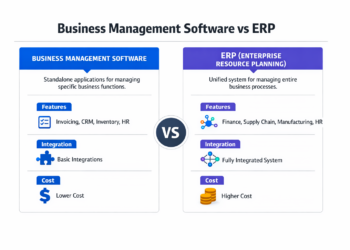
Business software encompasses digital tools powering operations, from inventory tracking to payroll to sales management.
Because business software encompasses such diverse functions across so many operational areas, strategic selection becomes critical for reducing errors and freeing teams to focus on growth rather than administrative overhead.
Research from the U.S. Chamber of Commerce links technology adoption directly to business performance. Companies with high tech adoption show improved sales, profit margins, and employment growth.
Salesforce’s 2026 report reveals 76% of small businesses increasing technology spending are growing, while 91% using AI report revenue boosts.
Given these dramatic performance gaps between tech adopters and laggards, this guide provides the framework for informed software decisions.
You’ll learn which categories matter most, how to evaluate options, and implementation best practices that determine whether software investments deliver returns or become expensive shelfware.
Key Takeaways:
- Strategic software adoption directly correlates with small business growth and profitability in 2026
- The global business software market will reach $744.71 billion in 2026, with SMEs driving 13.3% annual growth
- Successful software implementation requires matching tools to specific operational bottlenecks, not chasing trends
- 78% of small businesses have already invested in SaaS solutions, making software literacy a competitive baseline
What Is Business Software for Small Businesses?
Business software divides into two functional categories that serve distinct purposes.
Operational software handles daily functions. Accounting tracks cash flow and generates financial reports. Payroll ensures timely payments and tax compliance. Inventory manages stock levels and automates reordering. Project management coordinates team efforts and tracks deadlines.
Growth software drives revenue generation. CRM systems convert leads and manage sales pipelines. Marketing automation nurtures prospects and orchestrates campaigns. Analytics identify profit centers and provide performance insights. E-commerce platforms create online sales channels and process orders.
To see how these categories apply in practice, consider that a solo consultant needs operational basics like invoicing, scheduling, and basic CRM. That same consultant scaling to 10 people needs growth software to manage increased lead volume and analyze service margins.
Internal-facing tools serve your team. Communication platforms like Slack facilitate collaboration, time tracking software monitors billable hours, HR systems manage employee records and benefits. These tools improve productivity and reduce internal chaos.
Customer-facing tools serve clients and prospects. Ecommerce platforms process orders, helpdesk software manages support tickets, email marketing platforms nurture leads. These tools directly impact customer experience and revenue generation.
How Does Small Business Software Differ From Enterprise Software?
Enterprise software involves lengthy sales cycles and six-figure contracts. Small business software uses transparent pricing under $50 monthly per user with instant signup, eliminating procurement barriers and financial risk.
Enterprise platforms offer extensive customization because large organizations demand workflow flexibility across diverse departments. Small business software focuses on core use cases with sensible defaults, sacrificing granular control for faster implementation that delivers value in days rather than months.
Should You Choose Cloud-Based or On-Premise Software?
Cloud software runs on vendor servers accessed through browsers. On-premise software installs locally on your infrastructure.
Cloud dominates small business adoption for compelling reasons: monthly subscriptions replace large upfront licenses, automatic updates provide the latest features without IT intervention, remote access enables mobile productivity, and scalability happens instantly without infrastructure investments.
Internet connectivity becomes essential with cloud software. Security depends on vendor practices rather than internal controls. Long-term subscriptions may eventually exceed one-time licenses, though you offset this with eliminated IT maintenance costs and automatic feature additions. For most small businesses, these trade-offs rarely outweigh the benefits of reduced complexity and predictable costs.
On-premise makes sense for highly regulated industries with data residency requirements or businesses with substantial existing infrastructure investments. For most small businesses, the cloud delivers superior value through reduced complexity and predictable costs.
Small business software delivers value through:
- Self-serve purchasing with transparent monthly or annual pricing starting under $100 per user
- Rapid deployment measured in hours or days, not months
- Intuitive interfaces requiring minimal training or technical expertise
- Cloud-based delivery enabling access from multiple devices and locations
- Focused feature sets addressing core small business use cases without overwhelming complexity
What’s the Difference Between Vertical and Horizontal Business Software?
Software categories divide along industry lines, with horizontal solutions serving cross-industry needs while vertical solutions target specific sectors.
What Is Horizontal Software and How Does It Work?
Accounting functions identically for restaurants and law firms. Project management coordinates work whether you build software or remodel kitchens. Horizontal software serves businesses across industries with these universal processes.
The appeal is broad applicability and proven use cases. Millions using QuickBooks or Salesforce creates tested workflows and extensive documentation. Integration ecosystems multiply. Competitive pricing emerges from targeting the largest addressable market with economies of scale.
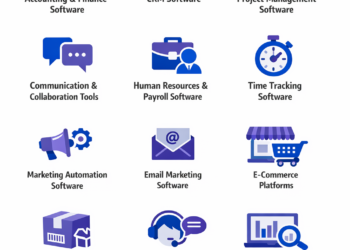
These foundational functions remain necessary regardless of whether you run a restaurant or a law firm. Common categories include accounting, CRM, project management, communication, email marketing, HR, and time tracking.
What Is Vertical Software and When Should You Use It?
Practice management for law firms includes docketing and trust accounting. Dental software manages patient charts and insurance billing. Restaurant management handles reservations, tip distribution, and kitchen display systems. Vertical software targets specific industries with specialized workflows, horizontal tools can’t replicate without extensive customization.
This focused development enables premium pricing that customers accept because alternatives require costly workarounds. The economics justify this approach, with Main Capital research showing vertical software achieves 15% median EBITDA margins versus 6% for horizontal providers.
Vertical software often emerges from industry insiders experiencing pain points firsthand. This domain expertise creates product-market fit horizontal software can’t match despite broader flexibility.
Limitations include smaller markets constraining vendor investment and potentially higher costs with fewer competitive alternatives.
How Do Vertical and Horizontal Software Compare?
Economies of scale benefit horizontal software through competitive pressure and extensive third-party integrations. Vertical software costs more but delivers higher ROI by eliminating workarounds. A $200 monthly dental system might replace three tools costing $150 combined while saving 10 hours weekly through integrated workflows.
| Aspect | Horizontal Software | Vertical Software |
| Market Characteristics | ||
| Target Market | All industries | Specific industry/niche |
| Market Size | Large, diverse customer base | Narrow, specialized segment |
| Product Features | ||
| Features | Cross-industry processes | Industry-specific workflows |
| Customization | Moderate, via settings/add-ons | Limited, pre-configured workflows |
| Economics | ||
| Pricing | Competitive, lower cost | Premium, focused value |
| Integration | Extensive third-party ecosystem | Limited, industry-focused connections |
| Examples | QuickBooks, Salesforce, Slack | Veeva (pharma), Zillow (real estate), Guidewire (insurance) |
What Are the Core Categories of Business Software for Small Businesses?
Business software divides into operational tools maintaining daily functions and growth tools driving revenue. Understanding which categories address your specific bottlenecks determines investment priorities.
Accounting & Finance Software
Tax penalties, missed deductions, and cashflow blindness kill businesses before owners understand why. Bookkeeping maintains accurate ledgers automatically while bank reconciliation matches transactions, catching errors and fraudulent activity before they compound.
Invoicing functionality generates professional, branded invoices with clear payment terms, establishing credibility with clients while standardizing your billing process. Recurring billing automates subscriptions, eliminating manual invoice generation for ongoing services. Payment tracking shows accounts receivable status, highlighting overdue payments requiring follow-up. Many platforms now process payments directly, eliminating separate payment processor relationships.
Expense tracking categorizes spending for tax preparation and budget monitoring. Receipt scanning via mobile apps captures documentation instantly, eliminating paper receipt management. Mileage logs track deductible travel automatically using GPS.
Beyond daily expense management, tax features simplify year-end filing by leveraging the categorization work already done. Automated categorization, 1099 generation, and accountant access portals eliminate file sharing chaos.
Application by Business Type
Freelancers require basic invoicing and expense tracking immediately. At this stage, mixing personal and business finances undermines professional credibility while losing track of billable work or deductible expenses directly impacts profitability. Every dollar matters when you’re building from zero.
Service businesses billing by the hour need time tracking integration with invoicing. Connecting logged time directly to invoices eliminates manual entry and billing errors. Project-based accounting tracks profitability per engagement, revealing which clients and services generate the best margins for strategic growth decisions.
Product businesses must understand product margins, inventory carrying costs, and cash flow tied up in stock. These metrics become critical for purchasing decisions and pricing strategies, requiring inventory accounting and cost of goods sold tracking for accurate decision-making.
Common accounting software use cases:
- Solo entrepreneurs managing basic income and expenses with automated invoicing
- Service businesses tracking billable hours, project profitability, and client payment status
- Product businesses monitoring inventory costs, COGS, and cash flow tied to stock levels
- All businesses requiring year-end tax preparation with organized, categorized transactions
Customer Relationship Management (CRM) Software
Better lead conversion rates and stronger client relationships come from organized contact management storing enriched customer profiles with communication history and custom fields capturing industry-specific details. Lead management captures prospects from multiple sources and ranks them by engagement level, ensuring sales teams prioritize high-potential opportunities.
Pipeline tracking visualizes how deals progress from initial contact through demo scheduling, proposal submission, negotiation, and final close. Activity logging records calls, emails, and meetings automatically, creating searchable interaction history that prevents knowledge loss when team members change roles or leave.
Sales-focused CRM prioritizes pipeline management, forecasting accuracy, and quota tracking. Service-focused CRM emphasizes ticket management, satisfaction tracking, and retention analytics. The industry itself recognizes this interconnection, as modern CRMs increasingly combine both approaches, reflecting the reality that customer success drives renewal revenue as powerfully as initial sales.
Business Scenarios Requiring CRM
Startups and solo founders operate with basic contact management and pipeline visibility, often starting with simple spreadsheets before graduating to dedicated software. When every prospect conversation lives in individual email inboxes, leads fall through cracks and follow-up timing becomes random.
As service businesses grow to 5-15 employees, lost leads, forgotten follow-ups, and scattered customer information create revenue leakage that compounds invisibly. Shared contact databases with full interaction history ensure any team member can pick up client relationships seamlessly. Institutional knowledge disappears when sales reps leave or get promoted, making CRM essential for continuity.
B2B companies with longer sales cycles track sophisticated pipelines and maintain forecasting accuracy. When deals take 3-6 months to close across multiple stakeholders, CRM becomes mission-critical infrastructure, documenting every interaction, scheduled follow-up, and deal stage progression that determines revenue predictability.
Project Management Software
Small teams of 3-10 people working on client deliverables need task tracking that assigns work with due dates and ownership. Dependencies create sequential relationships showing how delays cascade. Timelines visualize these relationships through Gantt charts, revealing bottlenecks before they derail delivery.
Resource allocation shows team capacity and prevents overloading individuals with competing priorities. Workload balancing ensures equitable task distribution while identifying when additional hiring becomes necessary to maintain delivery commitments.
Internal operations benefit from full transparency within teams where everyone sees all tasks and progress. Client-facing projects require carefully configured permissions and professional presentation that exposes only relevant project elements without overwhelming clients with internal complexity.
When projects involve multiple people, work stalls waiting for information, duplicates because nobody knows who’s handling what, or misses deadlines because dependencies weren’t visible. Even coordinating work across three people creates communication overhead that consumes hours weekly.
Implementation Across Team Sizes
Creative agencies and consultancies juggling multiple client projects require resource allocation features showing who’s overloaded and who has capacity for new work. Without this visibility, teams over-promise and under-deliver, damaging client relationships and team morale simultaneously.
Distributed teams replace the casual coordination that happens naturally in physical offices. Remote and hybrid teams need project management software as communication infrastructure, creating digital equivalents of quick desk check-ins and whiteboard planning sessions.
Email Marketing Software
Among digital marketing channels, email delivers exceptional returns. Shopify’s research documents $10-36 gained for every dollar spent, positioning it as one of the highest ROI channels small businesses can deploy. Lead nurturing educates prospects not ready to buy immediately, maintaining relationship warmth until purchase timing aligns. Retention marketing targets existing customers for upsells, cross-sells, and referral generation that expands customer lifetime value.
List management provides integrated signup forms and segmentation rules that group subscribers by behavior, preferences, or demographics. Campaign creation uses drag-and-drop editors producing professional emails without design expertise. Subject line testing optimizes open rates through A/B comparisons, while link tracking measures click-through rates revealing which content resonates.
Automation sequences trigger emails based on subscriber actions, creating sophisticated nurturing paths. Welcome series onboard new subscribers with brand introduction and value demonstration. Cart abandonment emails recover lost sales by reminding prospects about incomplete purchases. Re-engagement campaigns win back dormant subscribers showing declining engagement. Drip campaigns nurture prospects over weeks or months, progressively building trust and demonstrating expertise.
Strategic Applications
Ecommerce businesses implement cart abandonment recovery, purchase follow-ups, and promotional campaigns that drive repeat purchases. Manual email outreach to unorganized contact lists gets flagged as spam, provides zero performance insight, and becomes impossible to sustain at scale.
B2B service businesses run drip campaigns that educate prospects over weeks or months. Lead generation without nurturing leaves money on the table, since most prospects aren’t ready to buy on first contact. Email provides the patient, progressive relationship building that demonstrates expertise and builds trust until buying timing aligns with outreach.
Content creators and course sellers maintain email lists as owned audiences independent of social platform algorithms. Email provides direct communication channels for launching products, sharing content, and building community that social media reach can’t guarantee.
E-commerce Platforms
Launching online sales requires store creation using templates or drag-and-drop builders for product pages, category organization, and streamlined checkout flows. Mobile responsiveness ensures shopping works seamlessly across devices without separate mobile site development.
Payment processing accepts credit cards and digital wallets with PCI compliance handled by the platform, eliminating security certification burden. Multi-currency support enables international sales without payment infrastructure complexity.
Product and order management tracks inventory levels, processes orders, and integrates with shipping carriers for automated label generation and tracking number assignment. Automated stock alerts prevent overselling by removing products from display when inventory depletes. Low inventory warnings trigger reordering before stockouts impact sales.
Physical vs Digital Product Requirements
The specific requirements split sharply between product types. Physical products need comprehensive inventory management, shipping integrations, and return processing workflows. Weight and dimension tracking calculate shipping costs accurately during checkout. Fulfillment workflows coordinate picking, packing, and shipping with carrier selection optimizing cost versus delivery speed.
Digital products focus on instant delivery and license management rather than logistics. Inventory and shipping complexity disappears, but systems must prevent unauthorized distribution through download limits, license key generation, or time-limited access.
Implementation Needs
Product-based businesses of any size benefit from ecommerce infrastructure. Even businesses with physical retail locations gain from online ordering and local delivery capabilities. Without ecommerce platforms, businesses process orders manually, calculate shipping by hand, and miss the 24/7 sales opportunity.
Service businesses selling digital products like courses, templates, or software require instant delivery systems. Manual order processing doesn’t scale beyond dozens of customers, and customers expect immediate access after purchase.
B2B wholesale businesses require customer-specific pricing, bulk order capabilities, and integration with existing inventory systems. Modern B2B ecommerce platforms handle these complexities while providing self-service ordering that reduces phone and email order volume.
Communication & Collaboration Tools
Communication and collaboration tools solve a specific pain point in growing teams. Email chains with a dozen participants, attachments getting lost, and critical decisions buried in thread history create collaboration chaos that wastes hours daily. Real-time team messaging organizes by channels that separate conversations by project, topic, or team.
Direct messages handle one-on-one conversations requiring privacy. Threaded replies keep discussions organized, preventing important context from getting lost in scrolling feeds. Search surfaces past conversations and shared files instantly.
Video conferencing enables meetings regardless of geographic distribution. Screen sharing supports presentations and collaborative problem-solving. Recording captures meetings for documentation, training, or asynchronous review by team members unable to attend live.
File sharing creates central repositories replacing email attachments and local storage. Version control prevents confusion about which file version contains the latest changes. Permission management controls access to sensitive materials while enabling appropriate sharing.
Remote and Hybrid Work Context
These capabilities became critical during remote work shifts and remain valuable in hybrid environments where teams split time between office and home. Asynchronous communication accommodates flexible schedules and time zones, allowing teams to collaborate effectively without requiring simultaneous availability.
Organizations must guard against tool proliferation that creates its own problems. The average organization uses 110 different SaaS applications, creating communication sprawl that reduces productivity through constant context switching and fragmented conversations. Consolidation around core platforms improves efficiency by reducing the places teams must check for information.
Deployment Scenarios
Even two-person teams benefit from organized communication that doesn’t rely on personal text messages or endless email chains. Any business with remote team members needs video conferencing and chat infrastructure as baseline collaboration tools.
Teams managing complex projects require file sharing with version control and organized channel discussions that separate project coordination from general team chat and social conversation.
Client-facing businesses benefit from communication tools with external collaboration features, allowing controlled client access to project channels without exposing internal discussions or requiring clients to adopt new tools.
HR & Payroll Software
HR and payroll software automates wage calculation, tax withholding, and regulatory compliance. This automation is critical because manual payroll risks tax errors, late payments, and violations that trigger penalties exceeding software costs many times over. Wages get calculated, taxes withheld, and paychecks or direct deposits generated automatically.
Tax filing handles federal, state, and local requirements through automated submission, eliminating manual form completion and filing deadlines. Year-end W-2 and 1099 generation simplifies compliance with automatic data compilation from payroll records.
Employee records centralize personal information, employment history, performance reviews, and benefits enrollment. Self-service portals let employees update contact details, view pay stubs, download tax forms, and manage benefits elections without HR intervention, reducing administrative burden while improving employee experience.
Compliance features adapt to changing regulations automatically. Affordable Care Act reporting, unemployment insurance, and workers’ compensation integrate with payroll data, ensuring accurate filings without manual data transfer. Automatic tax rate updates prevent costly errors from outdated withholding tables.
Contractor vs Employee Distinctions
Contractor management requires simplified 1099 processing and flexible payment workflows without the tax withholding and benefits administration that employee management demands. Payment terms often differ, with net 30 instead of biweekly payroll requiring different processing systems.
Employee management involves complex tax withholding across federal, state, and local jurisdictions, plus benefits administration, paid time off tracking, and performance management integration. Compliance requirements multiply through workers’ compensation, unemployment insurance, I-9 verification, and employment eligibility documentation.
Implementation Requirements
Paying yourself as a sole proprietor requires minimal software, but adding even one employee brings payroll tax obligations that manual processing can’t handle reliably. Any business with W-2 employees needs payroll software immediately to avoid tax penalties and ensure timely, accurate payments.
Growing service businesses managing contractors alongside employees need systems handling both payment types with appropriate tax treatment and documentation for each worker classification.
Businesses in multiple states face exponentially more complex tax requirements. Payroll software prevents errors from navigating different state tax rates, local withholding requirements, and varying compliance obligations.
Time Tracking Software
Accurate billing and profitability insights come from precise time tracking across projects, clients, or tasks. Hours get logged through manual entry for knowledge work, timer-based tracking for focused sessions, or automated activity monitoring capturing computer usage patterns. Mobile apps enable field workers to clock in and out from job sites, capturing location data for verification.
Billable hours tracking separates client work from internal operations, ensuring accurate invoicing and profitability analysis. Approval workflows ensure logged time gets reviewed before invoicing, catching errors and providing managers visibility into team activity. Utilization reports show whether team members hit billing targets, informing capacity planning and hiring decisions.
Productivity insights reveal time allocation patterns. Which projects consume the most hours? Where do inefficiencies hide? Time data informs staffing decisions and project pricing that reflects actual delivery costs rather than estimates disconnected from reality.
Service vs Internal Team Applications
Service businesses billing hourly need precise tracking integrated seamlessly with invoicing. Every logged hour should flow automatically to client invoices without manual transfer, because estimating billable hours from memory guarantees lost revenue and inaccurate invoicing. Profitability analysis compares estimated versus actual hours per project, revealing whether estimates align with reality and which project types deliver the best margins.
Internal teams use tracking for workload balancing and productivity analysis rather than external billing. Understanding actual task duration improves estimating accuracy for future work. Identifying time sinks reveals automation opportunities that improve efficiency without adding headcount.
Critical Use Cases
Consultants, lawyers, and agencies billing hourly need time tracking as revenue infrastructure. Billing by the hour without time tracking means lost revenue from forgotten billable tasks and inaccurate estimates that erode profitability.
Project-based service businesses with fixed-price contracts still need time tracking for internal profitability analysis. You can’t improve pricing accuracy or identify unprofitable service offerings without knowing actual time investment per project type.
Remote teams benefit from time tracking for workload visibility and productivity baselines. When you can’t see who’s overloaded through physical office observation, time data provides objective capacity metrics for resource allocation decisions.
Marketing Automation Software
B2B companies with complex sales cycles need lead scoring that assigns points based on prospect behavior, including website visits, email opens, content downloads, and pricing page views. This creates quantitative engagement measures that identify sales-ready prospects. When scores reach predefined thresholds, automation triggers sales alerts for timely follow-up while prospects show peak interest.
Multi-channel campaigns coordinate email, social media, SMS, and advertising with consistent messaging. Prospects receive relevant content regardless of touchpoint, creating cohesive brand experiences. Attribution tracking reveals which channels drive conversions, informing budget allocation across marketing investments.
Customer journey automation maps prospect progression from awareness through consideration to purchase. Automated workflows deliver stage-appropriate content, with educational materials for awareness, comparison guides for consideration, and case studies for decision-making. Behavioral triggers respond to actions in real time, including cart abandonment, pricing page views, and webinar attendance, delivering timely interventions that move prospects forward.
Email Marketing vs Marketing Automation
Email marketing focuses specifically on email campaigns and automation. It’s a single-channel solution, though sophisticated platforms include landing pages and basic CRM functionality for subscriber management.
Marketing automation encompasses email plus other channels, advanced lead scoring algorithms, and deeper CRM integration that synchronizes sales and marketing activity. It coordinates entire customer journeys across touchpoints with sophisticated trigger logic and multi-step workflows. Cost and complexity increase significantly with full marketing automation. This makes it appropriate for established businesses with complex sales processes and multiple customer touchpoints, while early-stage ventures with straightforward sales motions should start with email marketing alone.
Strategic Implementation
Manually qualifying leads and determining follow-up timing leaves revenue on the table through slow response and misallocated sales attention. Growing businesses spending $5,000+ monthly on marketing benefit from automation’s attribution tracking and multi-channel orchestration. Running campaigns across email, social media, and advertising without coordination creates disjointed customer experiences and makes performance attribution impossible.
SaaS and subscription businesses require sophisticated onboarding sequences and engagement triggers. Marketing automation handles these complex, behavior-based workflows at scale without proportional staffing increases.
Helpdesk & Customer Service Software
Managing customer support efficiently requires converting customer inquiries into tracked tickets, ensuring nothing gets lost. Multi-channel intake captures requests from email, chat, phone, social media, and self-service portals, centralizing communication regardless of customer preference. Ticket routing assigns inquiries based on agent expertise, current workload, or issue priority, balancing efficiency with expertise matching.
Knowledge bases provide self-service support articles reducing ticket volume by enabling customers to solve common issues independently. FAQ sections, troubleshooting guides, and how-to videos empower customers while reducing support costs. Search functionality surfaces relevant articles quickly without customers browsing extensive documentation.
Customer communication channels maintain complete conversation history across touchpoints. Whether customers email today, chat tomorrow, or call next week, agents see full interaction context immediately. Canned responses speed common resolutions without sacrificing personalization. Sentiment analysis flags frustrated customers for priority handling before dissatisfaction escalates to churn.
Industry-Specific Requirements
SaaS businesses need technical troubleshooting capabilities, onboarding support reducing time-to-value, and proactive customer success outreach preventing churn. Tickets often involve bug reports, feature requests, or usage questions requiring product expertise. Integration with product analytics identifies at-risk customers before churn based on declining usage patterns.
Retail handles order tracking, returns processing, and product questions with high seasonal volatility. Support volume spikes during sales events requiring flexible staffing or enhanced self-service. Order status self-service reduces ticket volume for routine inquiries. Returns processing streamlines exchanges and refunds while capturing reasons for product improvement.
Service businesses manage appointment scheduling, delivery coordination, and billing inquiries within relationship contexts. Support emphasizes continuity and relationship management over transactional problem-solving. Calendar integration and appointment reminders reduce no-shows that waste capacity and revenue.
Deployment Triggers
Any business receiving 20+ customer inquiries weekly needs helpdesk software for ticket tracking and assignment. When customer emails scatter across individual team member inboxes, lost requests and invisible response times create service failures that drive churn. Once support volume exceeds what one person can handle through personal email, requests start falling through cracks and response times become inconsistent.
Businesses with seasonal volume spikes require ticket routing and self-service knowledge bases. Black Friday support volume shouldn’t require proportionally scaling your support team when self-service and intelligent routing can absorb much of the increase.
Companies where support quality determines retention need comprehensive conversation history and satisfaction tracking. When customer lifetime value is high and churn is expensive, investing in sophisticated helpdesk capabilities delivers clear ROI through improved retention rates.
Inventory Management Software
Inventory management software balances a critical tension. Selling products you don’t have in stock damages customer relationships permanently, while holding excessive inventory ties up cash that could fund growth. Stock tracking records units on hand, on order with suppliers, and allocated to pending shipments. Barcode scanning speeds receiving and fulfillment processes while reducing picking errors. Automated reorder points trigger purchase orders when inventory drops below thresholds, maintaining stock availability without constant monitoring.
Supplier management centralizes vendor contact information, negotiated pricing agreements, lead times, and complete order history. Purchase order creation and tracking coordinate inbound inventory with automated approval workflows. Receiving workflows verify shipments against orders, catching discrepancies immediately rather than discovering shortages during fulfillment.
Demand forecasting analyzes sales history and identifies trends predicting future inventory needs. Seasonal patterns inform purchasing decisions, ensuring adequate stock during peak periods while avoiding excess inventory during slow seasons that ties up cash unnecessarily.
Retail vs Ecommerce Distinctions
Retail needs point-of-sale integration syncing in-store and online inventory in real time. Multi-location tracking prevents overselling when the same SKU exists across multiple stores. Transfer workflows move inventory between locations based on local demand patterns, optimizing stock placement.
Ecommerce requires robust integration with online stores and marketplaces. When selling simultaneously on your website, Amazon, and eBay, inventory syncs across all channels preventing overselling from lack of real-time visibility. Warehouse management optimizes pick paths reducing fulfillment time and packing workflows ensuring accurate, damage-free shipments.
Implementation Requirements
Product businesses with 50+ SKUs need dedicated inventory software for stock tracking, reorder automation, and demand forecasting. Managing inventory mentally or through spreadsheets works until you hit about 50 SKUs or multiple storage locations.
Multi-channel sellers using both physical stores and online sales need real-time synchronization. Overselling because your POS and ecommerce platform don’t communicate creates fulfillment nightmares and disappointed customers.
Businesses with seasonal demand require forecasting capabilities. Toy stores, garden centers, and holiday-focused businesses must order months in advance based on historical patterns. Inventory software with demand forecasting prevents both stockouts during peak season and excess inventory during slow periods.
Business Analytics & Reporting Tools
Business analytics and reporting tools aggregate data from multiple systems into unified dashboards, replacing gut-feel decisions with data-driven insights while eliminating manual spreadsheet compilation. Data visualization presents metrics as charts and graphs instantly understandable without analysis expertise, democratizing data access across the organization.
Performance metrics track KPIs specific to your business model, including revenue, profit margins, customer acquisition cost, lifetime value, website traffic, and conversion rates. Goal tracking compares actual performance against targets with automatic variance alerts when results deviate significantly from expectations.
Forecasting uses historical data to project future trends with statistical confidence intervals. Predictive analytics identify patterns invisible to human analysis due to data volume or subtle correlations. Anomaly detection alerts you to unusual activity like sales spikes, traffic drops, or expense increases warranting immediate investigation before small problems compound.
Decision-Making vs Reporting Functions
Decision-making analytics emphasizes real-time data enabling immediate action. Interactive dashboards let you drill into metrics exploring causes behind trends. What-if scenarios model potential outcomes from strategic decisions before committing resources, reducing risk from major pivots.
Reporting focuses on historical performance documentation satisfying stakeholder needs. Standardized reports suit board meetings, investor updates, or regulatory compliance with consistent formatting and metrics. Scheduled report distribution ensures stakeholders receive updates automatically without manual generation and sending.
Business Contexts
Any business past initial launch phase benefits from analytics tracking core metrics like revenue, profit margins, and customer acquisition costs. Operating without data visibility means discovering problems weeks or months after they start, when solutions are more expensive and less effective. Making decisions based on gut feel rather than data means flying blind, reacting to problems after they’ve already damaged the business instead of seeing patterns early.
Multi-product or multi-channel businesses need analytics identifying which offerings drive profitability and which drain resources. Without clear performance data, you’re blind to where growth investments should focus.
Businesses with complex operations spanning marketing, sales, operations, and finance require unified dashboards preventing the pattern of stitching data together from five systems. This pattern wastes hours weekly and delays decision-making through data gathering lag.
How to Choose the Right Business Software for Your Small Business
Effective software selection follows a diagnostic process identifying specific pain points before evaluating solutions. This approach prevents feature-driven purchases disconnected from actual operational needs.
Selection Framework: From Problem to Solution
Step 1: Identify Specific Business Bottlenecks
The selection framework begins with a critical principle: identify pain points rather than software features. Which tasks consume excessive time? Where do errors occur repeatedly? What prevents serving more customers or launching new offerings?
Operational inefficiencies include manual data entry duplicating work across systems, information silos where critical knowledge lives in individual heads rather than accessible systems, and search time wasted locating documents or past decisions.
Revenue leaks appear as lost leads falling through tracking cracks, forgotten follow-ups missing optimal conversion timing, and unclear pricing or cost structures that erode profitability invisibly.
Step 2: Map and Document Current Workflows
Document every step from initial customer contact through delivery and payment collection. Identify where work stalls waiting for information, gets duplicated because systems don’t communicate, or requires excessive manual intervention. These bottlenecks represent software opportunities with quantifiable returns.
Step 3: Quantify Impact and Prioritize Investments
Prioritize problems by impact and frequency. A task taking 10 hours weekly at $50/hour costs $26,000 annually. Software eliminating it for $3,000/year delivers 8.6x ROI. High-frequency, high-cost problems warrant immediate investment. Low-frequency nuisances can wait regardless of severity.
Budgeting and Total Cost of Ownership
Software costs extend beyond sticker prices. Total cost of ownership includes subscriptions, implementation, training, integrations, and ongoing maintenance.
Subscription costs scale with users and features. Basic plans start affordable but advanced capabilities require premium tiers. Calculate annual spending rather than monthly fees for accurate budgeting. A $29 monthly tool costs $348 annually, reasonable for critical functionality but excessive for rarely-used features.
Implementation costs include data migration, configuration, and customization. Simple tools launch in hours with zero implementation investment. Complex enterprise software requires consultants charging thousands for proper setup. Budget 10-20% of first-year subscription costs for implementation effort.
Add-ons and upgrades creep into budgets invisibly. An affordable CRM needs the reporting add-on, integration package, and email automation module. Suddenly $50 monthly becomes $200. Evaluate full-featured pricing upfront rather than discovering costs incrementally.
Research shows companies spend 36% more on cloud services than necessary due to unused licenses, redundant tools, and over-provisioned resources. Regular quarterly audits prevent waste by reviewing user counts, canceling unused software, and consolidating overlapping tools.
Scalability and Long-Term Growth
Software ceilings frustrate growing businesses. You invest months learning a platform, build workflows around its logic, then outgrow its capabilities forcing painful migrations that restart the learning curve.
Evaluate user limits, storage caps, and feature restrictions across pricing tiers. Can the software accommodate 10x growth without forcing a platform change? Does it offer enterprise features you’ll need eventually, providing a clear upgrade path within the same ecosystem?
Migration risks increase with tenure. The longer you use a system, the more data and workflows tie you to it. Switching CRMs after five years means migrating thousands of contacts, years of communication history, and established sales processes. This represents a multi-month disruption risking data loss and productivity collapse. Choose platforms with clear upgrade paths within their ecosystem.
Ease of Use and Team Adoption
Feature sophistication becomes irrelevant without team adoption. User adoption determines software success more than technical capabilities or feature lists.
Intuitive interfaces minimize training requirements. Software requiring week-long training courses won’t see consistent use under daily operational pressures. Self-explanatory navigation and helpful tooltips enable self-service learning without constant manager support.
Capterra’s 2026 Software Buying Trends shows only one in three software buyers successfully adopt their purchases. Purchase regret correlates directly with implementation disruptions experienced by 89% of regretful buyers. Training investments directly impact these outcomes. Even tools marketed as simple require structured onboarding ensuring teams understand capabilities and workflows.
Integration and Software Ecosystems
Isolated software creates data silos requiring duplicate entry. Integrated ecosystems enable seamless information flow across tools, multiplying individual tool value through interconnections.
Building a connected tech stack requires evaluating integration capabilities upfront. Does your CRM connect with your email marketing platform? Can your ecommerce store sync with your accounting software? Do your project management and time tracking tools communicate bidirectionally?
Native integrations built by software vendors work more reliably than third-party connectors. Zapier and similar integration platforms fill gaps but introduce dependencies and potential failure points when services change APIs or pricing.
| Selection Criteria | Critical Questions | Red Flags |
| Business Fit | Does this solve our specific bottleneck? | Buying based on features, not problems |
| Budget | What’s total annual cost including add-ons? | Hidden implementation or integration fees |
| Scalability | Can this grow with us for 3-5 years? | Hard user limits or restrictive data caps |
| Usability | Can our team use this with minimal training? | Requires extensive training or technical expertise |
| Integration | Does this connect with our existing tools? | Proprietary systems with limited integration options |
What Are the Best Business Software Stacks by Business Type?
Software needs vary dramatically by business model. Effective stacks balance integration, cost, and scalability while addressing industry-specific workflows.
Solo Entrepreneurs and Freelancers
Solo operators need minimal software overhead while maintaining professional operations. Focus spending on tools directly enabling revenue generation or legal compliance.
You can’t afford tax penalties or lost income from disorganized finances. Wave offers free accounting and invoicing sufficient for many freelancers, while QuickBooks Self-Employed ($15/month) adds mileage tracking and quarterly tax estimates.
When juggling multiple clients and prospects, centralized contact information and follow-up reminders prevent lost opportunities. HubSpot’s free CRM handles essentials without subscription costs. Notion provides flexible databases doubling as CRM and project management.
Professional client interactions require video conferencing and automated scheduling. Zoom’s free tier accommodates most meeting needs. Calendly automates scheduling eliminating email tag. Google Workspace or Microsoft 365 provides email, document storage, and collaboration starting around $6 monthly.
Total Monthly Investment: $20-50 covering accounting, communication, and basic CRM
- Prioritize free tiers and essential functions over comprehensive features
- Upgrade as revenue grows and complexity increases
Service-Based Small Businesses
Service businesses need integrated systems connecting CRM, project management, time tracking, and invoicing. Client relationships and per-project profitability drive success.
Salesforce, HubSpot, or Zoho CRM ($25-30/user/month) captures leads and manages client relationships throughout the sales cycle and delivery. Choose based on sales process complexity and reporting needs.
Monday.com, Asana, or ClickUp ($10-20/user/month) coordinates delivery and tracks task completion across clients and team members. Features include timeline visualization, dependency tracking, and workload balancing.
Harvest, Toggl, or Clockify ($10-15/user/month) connects hours worked directly to client billing. Integration with invoicing eliminates manual data entry. Project profitability reporting shows which clients and projects generate the best margins.
FreshBooks or QuickBooks Online ($15-50/month) integrates with time tracking, automatically pulling logged hours into invoices. Essential for accurate billing and financial reporting.
Total Monthly Investment Per User: $60-115
- Scale across team size with a five-person service business running $300-575 monthly for complete operational software
- This investment typically delivers 3-5x return through improved efficiency and better client management
Product-Based and Ecommerce Businesses
Product businesses require integrated inventory, ecommerce, shipping, and accounting systems. Stock visibility and order fulfillment accuracy directly impact customer satisfaction and repeat purchase rates.
Shopify ($29+/month) or WooCommerce (free plugin plus hosting) provides storefront, payment processing, and basic inventory management. These all-in-one solutions suit most small product businesses without complex customization needs.
Shopify’s built-in system or dedicated tools like Cin7 or Ordoro ($100-300/month) handles inventory. Basic inventory suits simple operations. Dedicated systems add multi-location tracking, automated reordering, and advanced demand forecasting as SKU counts and volumes grow.
ShipStation ($10-60/month) or Easyship integrates with multiple carriers providing discounted rates and automated label printing. Essential for businesses shipping 50+ orders monthly.
QuickBooks Online or Xero ($30-70/month) connects with most ecommerce platforms, syncing orders and inventory for accurate financial reporting and tax preparation.
Google Analytics (free) plus Klaviyo ($20+/month) tracks website behavior and combines email marketing with ecommerce analytics, revealing customer lifetime value and campaign performance.
Total Monthly Investment: $200-500 for growing product businesses
- Cost depends on sales volume and complexity
- All-in-one platforms like Shopify reduce software sprawl but may lack specialized capabilities as you scale
Should You Choose Free or Paid Business Software?
What Are the Benefits of Free Software?
Free software reduces initial investment risk when testing new categories. You experiment with CRM, project management, or email marketing without financial commitment, enabling learning what features matter before paying for premium options.
Many free plans offer sufficient functionality for early-stage businesses. HubSpot’s free CRM includes unlimited contacts, deals, and tasks. Wave provides complete accounting and invoicing at no cost. Google Workspace offers generous storage and collaboration tools.
Free software often serves as strategic customer acquisition, with companies developing free tiers hoping you’ll grow into paid plans. This means free tiers receive ongoing development and support rather than becoming abandonware.
What Are the Limitations and Risks of Free Software?
Free plans impose restrictions hindering growth. User limits cap team size, often at 2-5 users. Storage caps force data cleanup or forced upgrades at inconvenient times. Feature restrictions withhold advanced capabilities like automation, reporting, or integrations.
Branding limitations frustrate customer-facing tools. Free invoicing software may include vendor logos or ads. Free email marketing appends “Sent with [Tool Name]” to messages, diluting professional image and brand consistency.
Support quality drops significantly on free plans. Expect community forums rather than live chat or phone support. When problems arise during critical operations, you research solutions instead of receiving immediate help. For mission-critical operations, this risk becomes unacceptable.
Data ownership and export capabilities may be restricted. Some free tools make data extraction difficult, creating lock-in despite zero financial investment. Confirm you can export data in standard formats before building critical workflows on free platforms.
When Does Paid Software Justify Its Cost?
Paid software justifies investment when free tier limitations actively constrain business operations. You’re turning away clients because your free CRM caps at 1,000 contacts. You’re manually working around automation features available only in paid tiers. Your team wastes hours on tasks that paid software would automate instantly.
Priority support becomes valuable as dependency increases. When software downtime costs hundreds or thousands in lost productivity and revenue, paying for guaranteed response times delivers clear economic returns.
Advanced features drive efficiency gains exceeding software costs. Marketing automation costing $200 monthly that generates five additional qualified leads worth $500 each delivers 12.5x return. Time tracking software costing $15 per user monthly that improves project profitability by 10% pays for itself immediately.
Salesforce research shows 78% of small businesses have already invested in SaaS solutions. Free software serves as testing grounds, not permanent solutions for growing operations requiring reliability and advanced capabilities.
| Aspect | Free Software | Paid Software |
| Cost | Zero monthly fees | $10-100+ per user monthly |
| User Limits | Typically 2-5 users | Unlimited or high limits |
| Features | Core functionality only | Advanced automation, reporting, integrations |
| Support | Community forums, documentation | Priority live chat, phone support, dedicated account managers |
| Branding | Vendor branding may appear | Custom branding, white-label options |
| Data Limits | Storage and volume caps | Higher or unlimited capacity |
| Best For | Testing, startups, simple needs | Growing businesses, complex workflows, mission-critical operations |
What Are the Common Mistakes Small Businesses Make With Software?
Software failures follow predictable patterns. Understanding these mistakes enables proactive avoidance rather than expensive learning through experience.
Overbuying Features
Purchasing enterprise CRM with AI-powered lead scoring, territory management, and complex workflows overwhelms five-person sales teams needing basic contact management and pipeline tracking. You’re paying for sophistication that impedes rather than enables productivity through complexity and unnecessary configuration requirements.
Start with tier one pricing. Upgrade when you’ve maximized current capabilities through consistent use and hitting feature limits, not speculatively. Ask which features your team will actually use daily versus capabilities that sound impressive during demos but sit dormant after purchase.
Tool Sprawl
Software proliferation emerges gradually as different team members adopt solutions solving immediate problems without coordination. Marketing uses Mailchimp. Sales prefers HubSpot. Support adopted Zendesk. Operations built Airtable databases. Suddenly you’re paying for six platforms with overlapping functionality while data scatters across isolated systems requiring manual reconciliation.
Consolidate tools serving similar purposes. Evaluate all-in-one platforms replacing multiple specialized tools. The productivity gains from integration often outweigh feature sacrifices from moving to consolidated platforms.
Ignoring Implementation
Assuming software works immediately after signup skips critical data migration planning, configuration, and training. Six months later, teams still use old processes because the new software wasn’t properly implemented. You’re paying subscriptions for unused tools.
Purchase regret nearly always follows implementation disruption. 89% of regretful buyers experienced these problems according to Capterra research. Allocate time and budget for proper onboarding. Schedule training sessions. Assign an internal champion managing the rollout and answering questions as they arise.
Poor Data Migration
Bulk importing customer data without cleaning duplicates, standardizing formats, or validating accuracy poisons new software adoption immediately. Your new CRM contains 500 contacts with wrong phone numbers, duplicate entries, and incomplete information. Teams lose trust in the system when data quality makes it unreliable.
Data quality determines software value through the fundamental principle of garbage in, garbage out. Clean data before migration through deduplication and standardization. Validate imports with spot checks catching errors early. Establish data entry standards preventing future degradation through clear field definitions and validation rules.
What Business Software Trends Are Shaping Small Businesses in 2026?
AI-Driven Automation
AI integration has transitioned from experimental to operational necessity. McKinsey’s 2025 State of AI report shows 88% of organizations now use AI regularly in at least one business function, up from 78% the previous year. For small businesses, AI automation delivers capabilities previously requiring dedicated specialist staff.
AI-powered inventory systems predict demand based on historical patterns, seasonality, and external factors like weather or local events. These systems trigger automatic reordering, reducing stockouts by 60-70% and overstock by 40-50% according to industry data. Small retailers gain enterprise-level inventory optimization without hiring supply chain analysts.
Customer service chatbots handle routine inquiries instantly, 24/7, without human intervention. They resolve common questions, qualify leads, and escalate complex issues to human agents with full context. Small teams deliver enterprise-level responsiveness without proportional staffing increases. The technology has matured beyond clunky early chatbots to conversational AI understanding context and intent.
Marketing automation using AI personalizes customer journeys at scale. The system analyzes behavior patterns, predicts purchase intent, and delivers relevant content automatically. One person manages campaigns that previously required marketing teams. AI determines optimal send times, subject lines, and content variations through continuous testing.
Accounting software now categorizes expenses, extracts data from receipts, and flags anomalies using AI. These capabilities reduce bookkeeping time from hours to minutes while improving accuracy. The system learns your categorization preferences and applies them consistently across transactions.
Effective AI integration embeds intelligence in existing workflows rather than requiring standalone AI tools. You don’t need AI expertise. You need software providers integrating AI into features you already use. This embedded approach removes technical barriers making AI accessible to non-technical business owners.
All-in-One Platforms
Software consolidation counters sprawl through comprehensive platforms integrating multiple functions. Instead of separate tools for CRM, email marketing, project management, and invoicing, all-in-one platforms integrate these functions under single login with unified data.
The appeal is obvious. Unified data eliminates integration complexity, lower total cost reduces software spending, and streamlined workflows improve team efficiency. HubSpot, Zoho, and Monday.com have evolved from point solutions into comprehensive platforms serving multiple business functions. Data flows seamlessly between modules without integration middleware or data synchronization delays.
The trade-off involves accepting good-enough functionality across categories versus best-in-class specialized tools. Zoho’s accounting may not match QuickBooks. HubSpot’s project management lacks Asana’s sophistication. But productivity gains from integration often outweigh feature gaps. When your CRM automatically creates invoices from closed deals, that efficiency compensates for missing advanced accounting features.
All-in-one platforms suit businesses valuing simplicity and integration over specialized depth. They work well for generalized service businesses, consultants, and B2B companies with straightforward operations. Complex manufacturers or specialized industries often still need best-in-class point solutions.
No-Code and Low-Code Tools
No-code platforms democratize software creation, enabling non-technical users to build custom applications without programming knowledge. Fortune Business Insights projects the low-code development market will grow from $37.39 billion in 2025 to $264.40 billion by 2032, representing a 48% compound annual growth rate.
Small businesses use no-code tools to create custom CRM systems, project tracking databases, client portals, and automated workflows tailored precisely to their operations. Airtable, Notion, and Bubble represent the leading edge of this movement. These platforms provide visual interfaces where you drag and drop components to build applications matching your exact processes.
The advantage is customization without developer costs or extended timelines. You build exactly what you need rather than bending operations to fit off-the-shelf software. Changes happen in minutes, not development sprints. A service business can create a custom client portal showing project status, invoices, and deliverables without hiring developers or waiting months for completion.
The limitation is scalability. No-code solutions often hit performance walls at high transaction volumes. Complex logic still requires actual programming. Security and compliance may lack enterprise-grade rigor. Integration options may be limited compared to established platforms with extensive API ecosystems.
For small businesses with unique workflows and limited budgets, no-code delivers remarkable flexibility. Use it for internal tools where customization matters more than scale. Avoid no-code for customer-facing systems requiring high reliability and performance. The sweet spot is internal process automation and data management where flexibility needs exceed enterprise feature requirements.
Cybersecurity and Data Privacy
Data breaches and ransomware attacks increasingly target small businesses. Criminals recognize small companies often lack sophisticated security while possessing valuable customer and financial data. The misconception that “we’re too small to target” creates vulnerability exploited by automated attack tools scanning for weak defenses.
Software vendors respond with enhanced security features becoming standard rather than premium add-ons. Two-factor authentication requires both password and device verification. Encryption protects data at rest and in transit, making stolen data unusable without decryption keys. Automated backup ensures recovery from ransomware attacks. Compliance certifications like SOC 2 demonstrate security commitment through independent audits.
Small businesses need security-first thinking when evaluating software. Does the vendor encrypt data? How often do they perform security audits? What’s their incident response plan? Where do they store data physically? Review security documentation before committing to platforms handling sensitive customer or financial information.
Privacy regulations like GDPR and CCPA impose obligations on businesses collecting customer data. Software must facilitate compliance through consent management, data export capabilities, and deletion workflows. Non-compliance risks fines and reputational damage eroding customer trust. Choose platforms with built-in privacy features.
What Are the Implementation Best Practices for Small Business Software?
Planning and Rollout
Phased rollout reduces risk compared to big-bang launches affecting entire organizations simultaneously. Implement software for one team or process first. Work through issues, document solutions, and establish best practices before expanding organization-wide. This approach contains disruption while building internal expertise.
Pilot programs identify problems in controlled environments before they impact broader operations. Select enthusiastic early adopters willing to provide candid feedback. Their success creates internal champions advocating for broader adoption. A five-person pilot reveals most implementation challenges without disrupting 50 people.
Communication plans explain the why behind changes, not just the what. What problems does this software solve? How will it make jobs easier? What’s the timeline? What support is available? Transparency builds buy-in and reduces resistance rooted in fear of unknown changes.
Training and Change Management
Resistance to change kills more software implementations than technical problems. Small Business Majority research shows 44% of small business owners not using accounting software cite comfort with current methods as their primary reason. This psychological barrier requires intentional management strategies beyond technical training.
Effective change management starts with clear communication about why change is necessary and how it benefits individuals, not just the organization. What frustrations does this eliminate? What new capabilities does this enable? Framing change in terms of personal benefits rather than organizational mandates improves receptivity.
Hands-on training beats documentation consistently. Let people use the software in safe environments where mistakes don’t impact real operations. Create sandbox accounts with test data. Encourage exploration and experimentation without fear of breaking things or creating embarrassing errors.
Ongoing support prevents backsliding to old processes. Designate internal experts teammates can ask when confused rather than struggling alone or abandoning new tools. Schedule regular check-ins addressing problems before frustration builds into rejection. Celebrate early wins publicly, reinforcing positive experiences and building momentum.
Measuring ROI
Software ROI combines tangible and intangible benefits that together justify investment decisions.
Tangible ROI includes time saved, error reduction, and revenue increases directly attributable to software. Calculate hours saved weekly, multiply by hourly labor costs, and compare against software subscription costs. Factor in reduced error correction time and rework.
Intangible benefits include improved customer satisfaction, team morale, and competitive positioning. These matter despite challenging quantification. Survey customers about responsiveness improvements after implementing helpdesk software. Measure employee satisfaction before and after rolling out project management tools reducing coordination chaos.
Track adoption indicators showing whether implementation succeeds. Login frequency indicates whether teams actually use the software. Feature utilization shows whether you’re leveraging capabilities you’re paying for. Support ticket trends reveal whether users struggle with the software or have successfully adopted it into workflows.
Set success criteria before implementation, not after. Define specific metrics you expect to improve and by what amount. “Reduce invoice processing time by 50%” or “Increase qualified leads by 20%” provide clear targets enabling objective evaluation.
Software implementation steps:
- Identify the specific business bottleneck the software will address with measurable baseline metrics
- Select 2-3 software options and trial each with key users before purchasing
- Clean and prepare existing data ensuring accuracy before migration
- Create a phased rollout plan starting with one team or department
- Schedule hands-on training sessions with practice scenarios using real business situations
- Designate internal champions teammates can contact for questions and troubleshooting
- Set a firm cutover date when old systems will be discontinued
- Monitor usage metrics and gather user feedback weekly during the first month
- Measure success against predefined goals at 30, 60, and 90 days post-implementation
- Optimize based on feedback and expand to additional teams or features
Frequently Asked Questions About Business Software for Small Businesses
How much should a small business spend on software?
Budget 1-3% of annual revenue for software subscriptions as a general guideline. A business generating $500,000 annually might spend $5,000-15,000 on software, roughly $400-1,250 monthly. This scales with business size and software dependency.
Service businesses typically spend toward the higher end because software directly enables revenue generation and client delivery. Product businesses with physical operations may spend less since more capital goes to inventory and equipment. Technology-dependent businesses may exceed 3% if software constitutes their primary competitive advantage.
Start with essential categories including accounting, CRM, and communication tools. Add specialized software as specific needs emerge from growth or operational complexity. Resist buying speculatively. Purchase software solving current problems, not potential future needs.
Can one tool replace multiple tools?
All-in-one platforms successfully replace multiple specialized tools in many scenarios. HubSpot combines CRM, email marketing, and basic service desk functionality. Zoho offers 40+ applications covering most business functions. These consolidations reduce costs and complexity while improving data flow.
However, best-in-class specialized tools often outperform all-in-one platform modules. QuickBooks provides more robust accounting than most all-in-one business software. Salesforce offers more sophisticated CRM capabilities than platforms bundling CRM with other functions.
The decision depends on priorities. Choose all-in-one platforms when integration, simplicity, and cost control matter most. Choose specialized tools when specific functions are mission-critical and warrant best-in-class capabilities even at the cost of integration complexity.
How often should software be reviewed?
Annual software audits prevent waste and ensure tools still fit evolving needs. Review each subscription asking: Are we using this? Does it still solve our problem? Are we paying for unused features? Can we consolidate with other tools?
Major business changes warrant immediate software review. Adding team members, launching new products, expanding to new markets, or pivoting business models may require different software capabilities than current tools provide.
Monitor software vendor changes quarterly. Pricing increases, feature removals, or security incidents may trigger switching discussions. Stay aware of competitive alternatives emerging in categories where you have significant investment.
Is industry-specific software always better?
Vertical software delivers superior value when your business fits squarely within its target industry and relies heavily on industry-specific workflows. Legal practice management software handles trust accounting, docketing, and conflict checks that generic business software can’t address properly.
However, vertical software costs more, offers fewer integration options, and may lock you into smaller vendor ecosystems with less competitive pressure driving innovation. If you’re a hybrid business straddling industries or your workflows deviate from industry norms, horizontal software provides more flexibility.
Evaluate whether industry-specific features justify premium pricing and reduced integration options. Sometimes combining best-in-class horizontal tools beats mediocre vertical software bundling many functions without excelling at any.
What software should a new business start with?
Every new business needs accounting and invoicing software immediately. Tax compliance and financial tracking aren’t optional. Start with free options like Wave or entry-level QuickBooks if budget permits.
Add communication and collaboration tools next. Email, calendar, and document storage form baseline infrastructure. Google Workspace or Microsoft 365 provide complete suites affordably.
The third priority depends on your business model. Service businesses need CRM to track prospects and clients. Product businesses need inventory management. Online businesses need ecommerce platforms. Let your revenue model guide this decision.
Resist buying software speculatively. You don’t need project management software before you have projects to manage. You don’t need marketing automation before you have steady lead flow justifying automation investment. Start minimal and add software addressing actual pain points as they emerge through growth.
Final Summary: Building a Scalable Software Foundation for Long-Term Growth
Smart software decisions compound over time. The tools you choose today shape operational efficiency, team productivity, and customer experience for years ahead. Hasty decisions create technical debt through switching costs, lost data, disrupted workflows, and frustrated teams learning new systems repeatedly.
Approach software selection strategically, not reactively. Understand your business model, map workflows, identify bottlenecks, and then find software addressing specific problems. Avoid feature-driven purchases and consultant recommendations disconnected from your operational reality. Start simple and scale deliberately.
Your software stack represents strategic infrastructure, not mere expense. It enables scaling beyond founder capacity, operating remotely across geographies, and delivering consistent customer experiences. Companies treating software as strategic assets rather than costs position themselves for sustainable competitive advantage in 2026 and beyond.